How to Fix a Stuck or Unconfirmed Crypto Transaction
You hit send, the wallet shows "pending", and an hour later nothing has moved. It feels like the money vanished, but in almost every case it has not. A stuck transaction is sitting in line, waiting to be picked up, and there are a few ways to push it through or get your coins back.
Why transactions get stuck in the first place
Your transaction does not go straight into the blockchain. It first lands in a waiting room called the mempool, where it sits until a miner (Bitcoin) or validator (Ethereum and most other chains) picks it up and puts it in a block. They pick the ones that pay them the most. So the usual reason a payment stalls is simple: the fee you attached is too low for how busy the network is right now.
There are three common causes:
- Low fee. You sent during a quiet moment with a tiny fee, then the network got busy. Cheaper transactions get skipped over and over.
- A full mempool. During a price spike or a popular token launch, thousands of people are bidding for the same block space. Even a normal fee can fall behind.
- A nonce gap (Ethereum and similar chains). Every transaction from your address gets a number called a nonce, and they must confirm in order. If transaction number 41 is stuck, then 42, 43 and everything after it will wait behind it, even if those later ones paid a fine fee.
None of these mean your coins are gone. They mean your transaction is waiting for a better offer or for the line to clear.
First step: look it up on a block explorer
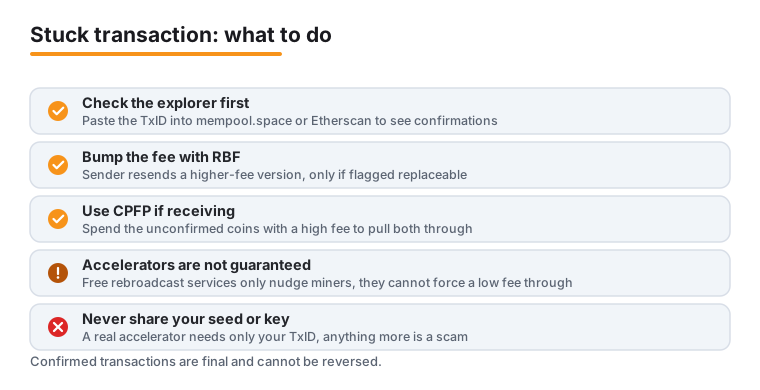
Before you touch anything, find out what state your transaction is actually in. Copy the transaction ID (often labelled TxID or hash) from your wallet's activity or history screen, then paste it into a block explorer.
- For Bitcoin, use mempool.space or blockstream.info.
- For Ethereum and EVM chains, use Etherscan (or the matching explorer like Polygonscan or Arbiscan).
The explorer tells you the truth your wallet sometimes hides. Look for the number of confirmations. Zero confirmations means it is still in the mempool and unconfirmed. One or more confirmations means it is already in a block and you are simply waiting for it to settle, in which case the only thing to do is wait a little longer. On mempool.space you can also see the current fee rates and whether your fee is near the bottom of the queue. If your transaction is not showing up on any explorer at all, it may never have broadcast, and resending after a wallet restart can fix that.
Sometimes the right move is to wait
This is the boring answer nobody likes, and it is often correct. Network traffic comes in waves. A mempool that is jammed at midday can clear out by early morning, and a transaction that looked hopelessly stuck gets swept up once the backlog drains. As of mid 2026, Bitcoin fee rates have spent long stretches sitting low, sometimes around 1 to 2 sat/vB, which means many "stuck" payments confirm on their own within a day once activity dies down.
If the amount is not urgent, give it a few hours, or overnight, before you spend money on a fix. Check the explorer again in the morning. A lot of stuck transactions quietly resolve themselves, and the cheapest fix is patience.
Replace-by-Fee: bump the fee on the same transaction
Replace-by-Fee, or RBF, lets the sender broadcast a new version of the same transaction with a higher fee. The replacement out-bids the original, miners take the better-paying one, and the first version drops away. It is the cleanest fix when it is available.
The catch, and this is the honest limit: RBF only works if the original transaction was flagged as replaceable when you sent it. This is sometimes called opt-in RBF or BIP125. If it was not flagged, the network will reject the replacement and you cannot use this method. Plenty of modern wallets now turn RBF on by default, so check before you assume. In a Bitcoin wallet that supports it, look for a "Bump fee", "Increase fee" or "Boost" button on the pending transaction.
On Ethereum and EVM chains the same idea exists and it almost always works, because you can resubmit a transaction with the same nonce. In MetaMask, open the Activity tab, tap the pending transaction, and choose Speed Up to resend with a higher gas fee, or Cancel to replace it with a zero-value transaction to yourself that frees the stuck nonce. If you need fine control, MetaMask lets you set a custom nonce under Settings, then Advanced, so you can target the exact stuck transaction.
Child-Pays-for-Parent: when you are the one receiving
What if the stuck transaction is one being sent to you, or your wallet has no RBF option? That is where Child-Pays-for-Parent (CPFP) comes in. It is a Bitcoin trick where you spend the unconfirmed incoming coins in a new transaction and attach a high fee to that new "child". Because a miner cannot confirm the child without also confirming the "parent" it depends on, they take both together to collect the fat fee.
You need a wallet that lets you spend unconfirmed funds and set a custom fee. Electrum is the common choice here, and many wallets expose CPFP behind a right-click or a "Bump fee" menu when RBF is not possible. CPFP is the right tool when you are the recipient and have no other way to raise the fee, or when the sender used a non-replaceable transaction. The downside is that you pay extra fees yourself to rescue a payment that was someone else's responsibility, so it makes most sense for larger amounts.
Free accelerators and what they really do
If you cannot use RBF or CPFP, a transaction accelerator is the last lever. An accelerator does not change your transaction. It rebroadcasts your existing transaction ID to a wide set of well-connected nodes and miners, and on some services a partner mining pool agrees to prioritise it. Free options that exist in 2026 include BitAccelerate, which rebroadcasts to around twenty popular Bitcoin nodes, and Fujn. ViaBTC, one of the longest-running services, has a free tier as well as a paid one, where the paid version pushes harder to more miners.
Two honest warnings. First, free accelerators are not guaranteed. They nudge, they do not force. If your fee is far too low, no amount of rebroadcasting will make a miner choose your transaction over better-paying ones. Second, watch out for scams. A real accelerator only ever needs your transaction ID. If a site asks for your private key, your seed phrase, or an upfront payment to a random wallet address, close the tab. The well-known paid option is the official Mempool Accelerator on mempool.space, which is a paid service with no free tier and lets you pay to lift your transaction to a chosen fee rate.
The honest limits, and why your money is safe
Here is the part that should calm you down. An unconfirmed transaction has not actually moved your coins yet. The funds are flagged but not spent. So if every fix fails, you have not lost anything.
Bitcoin nodes are set by default to drop a transaction from the mempool after 336 hours, which is 14 days, if it never confirms. Many nodes drop them sooner, often within a few days, depending on their settings and how congested they are. Once a transaction is dropped, the coins it was using become available again in your wallet, and you can simply resend with a proper fee. The money was never in danger.
The flip side is the one rule that never bends: once a transaction is confirmed, even with a single confirmation, it is final. You cannot reverse it, cancel it, or claw it back. RBF, CPFP and accelerators only work while a transaction is still unconfirmed. So if you sent coins to the wrong address and it has already confirmed, none of the methods here will help, and your only hope is asking the recipient to send them back.
How to avoid this next time
A few habits keep you out of the waiting room. Before you send, glance at a fee estimator like mempool.space to see what the network is charging right now, instead of trusting a stale default. Most good wallets let you pick a fee tier; the medium or "economy" option is fine when you are not in a rush, but bump it up when the mempool is busy.
Turn on RBF in your wallet settings if it offers it, so future transactions can be bumped without drama. On Ethereum, do not fire off a second transaction while an earlier one is still pending, or you create the nonce gap that traps both. And keep your wallet software updated, since older versions sometimes set fees badly or lack the speed-up controls you will want when a payment stalls.
Frequently asked questions
Is my money lost if a transaction is stuck?
No. An unconfirmed transaction has not moved your coins yet, it has only flagged them. If it never confirms, nodes drop it after up to 14 days (often sooner), the coins free up in your wallet, and you can resend with a higher fee. The only point of no return is a confirmed transaction, which cannot be reversed.
How long before a stuck transaction disappears on its own?
Bitcoin Core's default is 336 hours, which is 14 days, before a node evicts an unconfirmed transaction from its mempool. Many nodes use a shorter window and drop them within a few days. There is no fixed guarantee, since it depends on each node's settings and how busy the network is, but once it is dropped your funds become spendable again.
Why can't I use Replace-by-Fee on my transaction?
RBF on Bitcoin only works if the transaction was flagged replaceable when it was sent, which is called opt-in RBF or BIP125. If your wallet did not flag it, the network rejects any replacement. Many newer wallets enable RBF by default, so check your wallet's settings or the transaction details on a block explorer. On Ethereum, replacing by nonce works regardless, using Speed Up or Cancel.
What is the difference between RBF and CPFP?
RBF is used by the sender to rebroadcast the same payment with a higher fee, which replaces the original. CPFP is used by the receiver, who spends the unconfirmed incoming coins in a new high-fee child transaction, forcing a miner to confirm both the parent and child together. Use RBF if you sent the payment and it was flagged replaceable; use CPFP if you are receiving or RBF is not available.
Are free Bitcoin transaction accelerators safe and do they work?
Reputable free accelerators like BitAccelerate, Fujn, and ViaBTC's free tier only need your transaction ID and simply rebroadcast it to more nodes and miners. They are not guaranteed, since they cannot force a miner to pick a badly underpaid transaction. Never use any "accelerator" that asks for your private key, seed phrase, or an upfront payment to a wallet address, as that is a scam.
My Ethereum transaction is stuck and now everything after it is too. What do I do?
That is a nonce gap. Ethereum confirms your transactions in order, so a stuck one blocks all the later ones behind it. Open the pending transaction in MetaMask's Activity tab and use Speed Up to raise the gas fee, or Cancel to replace it with an empty transaction that clears the nonce. Once that one resolves, the queued transactions behind it will move.
Last updated: 2026-06-24.