How to Set Up a Self-Custody Wallet
Holding crypto on an exchange means the exchange holds the keys, not you. If it freezes withdrawals, gets hacked, or goes under, your access depends on a company. A non-custodial wallet flips that: you hold the keys, so you alone control the funds. That power comes with full responsibility, because there is no support line that can reset a lost recovery phrase. This guide walks a complete beginner through picking a wallet, creating it, backing it up safely, moving a small amount off an exchange as a test, checking addresses, and keeping things secure afterward. It is educational content, not financial advice.
What "holding your own keys" actually means
Every crypto wallet is built around a secret. When you create a non-custodial wallet, the app generates a list of ordinary English words, usually 12 and sometimes 24. This is your recovery phrase (also called a seed phrase). Those words are a human-readable version of the master key to every address the wallet can make.
Two simple facts follow from this:
1. Anyone who has your phrase can take everything, instantly and permanently. No password on the app stops them, because the phrase rebuilds the wallet from scratch on any device.
2. If you lose the phrase and lose the device, the funds are gone. No company can recover them.
The phrase itself follows an open standard called BIP-39, which is why the same 12 or 24 words can restore your money in many different wallet apps. A 12-word phrase already gives 128 bits of security, which is far beyond what anyone can guess; 24 words give 256 bits. For a beginner, 12 words is plenty. If you want the background on keys and addresses first, our explainer on how crypto wallets work and the basics of how a blockchain records transactions are good companions to this page.
Hot wallet or hardware wallet: which to start with
There are two broad kinds of self-custody wallet.
A software (hot) wallet is a free app on your phone or browser. The keys live on the device. It is convenient and good for small amounts and daily use. The downside: if your phone is compromised by malware, the keys are exposed.
A hardware wallet is a small physical device that keeps the keys offline and signs transactions on its own screen, so they never touch your internet-connected computer. It costs money but is much safer for larger holdings. As of 2026, entry-level models are reasonably priced: popular picks such as the Ledger Nano S Plus and the Trezor Safe 3 are both listed at 59 USD on the makers' own stores, while premium touchscreen models run higher. We cover this category in more depth under cold storage for crypto.
A sensible plan for most people: start with a free, well-known mobile app to learn the mechanics with a tiny amount, and buy a hardware wallet later once you hold an amount you would be upset to lose. This guide uses a free mobile app for the walkthrough, because that is where almost everyone starts.
Picking a beginner-friendly app
Stick to wallets with a long track record, open-source code, and a large user base. A few that fit that description in 2026:
Trust Wallet is a popular mobile-first option that supports many blockchains in one app and reports more than 220 million downloads, which makes it a reasonable default for a first multi-chain wallet. MetaMask is the most widely used wallet for Ethereum and connecting to apps, though its interface assumes a bit more knowledge. Phantom started on Solana and is known for a clean first-run experience.
How to choose without overthinking it: if you bought Bitcoin, use a Bitcoin-capable wallet; if you bought Ethereum or tokens on Ethereum, MetaMask or Trust Wallet both work; if you are on Solana, Phantom is a natural fit. The single most important rule is to download only from the official source. Type the official website into your browser by hand, or use your phone's App Store / Google Play, and check the developer name and review count. Fake wallet apps and fake browser extensions are a common way people lose funds. Never install a wallet from a link sent to you in a message, email, or social media post.
Creating the wallet, step by step
The exact wording differs slightly between apps, but the flow is almost identical everywhere. Using a mobile app as the example:
1. Install the app from the App Store or Google Play. Confirm the publisher matches the official company.
2. Open it and choose Create a new wallet (not Import, which is for restoring an existing one).
3. Accept the terms, then set a device password or PIN, and enable the phone's fingerprint or face login if offered. This protects the app on this phone. It is not your recovery phrase.
4. The app will show your recovery phrase, or offer to reveal it under a setting such as Settings > Security > Back up wallet or Reveal Secret Recovery Phrase. Do this somewhere private, with no one watching and no cameras pointed at the screen.
5. Write the words down on paper, in order, numbered 1 to 12. Double-check the spelling of each word against the screen. One wrong or out-of-order word can make the backup useless.
6. The app usually asks you to confirm the phrase by tapping the words back in the right order. This is a real check, not busywork. Complete it.
Once that is done, the wallet is live and ready to receive funds.
Backing up the recovery phrase safely
This is the part people rush, and it is the part that decides whether you keep your money. The phrase should exist only in places you physically control and never in any internet-connected form.
Do this:
1. Write the phrase on paper by hand. Make at least two copies.
2. Store the copies in two separate, safe, private places, for example a locked drawer at home and a second secure location. Two copies in different places protects against fire, flood, and loss.
3. For an amount you really care about, consider a metal backup plate. Paper fails to fire, water, and humidity; stamped or engraved metal survives those, which is why backup specialists and hardware-wallet makers sell metal plates for exactly this purpose.
4. Keep the wording in the order the app showed it, with clear numbering so you can re-enter it without guessing.
Never do this:
1. Do not take a photo or screenshot of the phrase. Photos sync to the cloud automatically.
2. Do not type it into Notes, email, a password manager, a chat, or any cloud document.
3. Do not say it out loud to a voice assistant or read it on a video call.
4. Do not enter it on any website. A real wallet app asks for the phrase only when you are restoring a wallet, not to "verify," "sync," "validate," or "claim" anything. MetaMask's own guidance is blunt: never share your Secret Recovery Phrase with anyone, including people claiming to be from MetaMask, because the team will never ask for it (MetaMask Help Center). Treat that as the rule for every wallet.
A useful mental model: anyone who asks you to enter or share your recovery phrase is trying to rob you. There are no exceptions.
Sending a test amount off the exchange
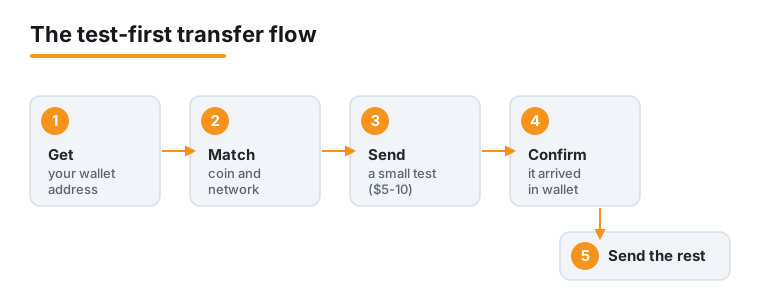
Before moving real money, prove the whole path works with a tiny amount first. This single habit prevents the most expensive beginner mistakes. Here is a worked example using a US exchange such as Coinbase, moving a small bit of Ethereum:
1. Get your receiving address. In the wallet app, tap Receive, then pick the exact coin and network you are sending (for Ethereum, the Ethereum network). The app shows a long address starting with 0x and a QR code. The address is safe to share; it is like an account number for incoming funds.
2. Match the network on both sides. The coin and network you select on the exchange must match the wallet's. Sending on the wrong network, for example picking a cheaper network the receiving wallet is not set up for, is a frequent way funds get stuck or lost.
3. Start the withdrawal. On the exchange, choose the asset, select Send or Withdraw, and paste the address (more on doing this safely in the next section). Coinbase charges a send fee based on its own estimate of prevailing network fees rather than a separate service charge, and notes the final fee it pays can differ because of batching and congestion; instead it passes on the blockchain network fee, which it estimates at the time of the transaction (Coinbase fees disclosures). For Ethereum that network fee is usually well under a dollar in calm conditions and can rise sharply when the network is busy.
4. Send a small test first. Move a small amount, say 5 to 10 USD worth, and confirm. A crypto withdrawal usually lands within a few minutes on Ethereum, though slower networks and exchange security checks can stretch that to an hour or more.
5. Confirm it arrived in the wallet, then send the rest. The test fee is a tiny price for certainty, because a crypto transaction cannot be reversed or refunded once it is confirmed.
If you want a refresher on the buying and selling side before withdrawing, see our guide on how to buy and sell crypto.
Verifying addresses and avoiding clipboard tricks
Crypto addresses are long strings of letters and numbers, so almost everyone copies and pastes them. Attackers know this, and two scams target exactly that habit.
Clipboard-hijacking malware watches your clipboard and, the instant it sees a crypto address, swaps in the attacker's address. You paste what looks right but is not. A Linux strain called ClipXDaemon spotted in early 2026 did exactly this. Address poisoning sends you a tiny "dust" transaction from an address whose first and last characters match one you use often, hoping you will later copy that lookalike from your history.
How to defend against both:
1. After pasting an address, check the whole thing, not just the first and last few characters. Ledger's security team notes that attackers count on people verifying only the ends, so compare the middle too (Ledger Academy).
2. Prefer scanning the QR code over copy-paste when both devices are in front of you. A scanned code cannot be altered by clipboard malware.
3. For repeat sends, save the verified address to the wallet's address book and pick it from there, rather than copying from transaction history.
4. Send the small test transfer (above) before any large one, every time.
5. On a hardware wallet, confirm the address on the device's own screen, which malware on your computer cannot change.
Ongoing security and common mistakes
With the wallet set up and tested, a few steady habits keep it safe:
1. Keep small and large amounts separate. Use the hot wallet for spending money and a hardware wallet for savings you rarely touch.
2. Update the app from the official store, and update your phone's operating system. Old software has known holes.
3. Be very careful with "connect wallet" prompts. Connecting to a malicious site and approving a transaction can drain a wallet even though you never shared your phrase. Only connect to sites you sought out yourself, and read what each approval asks for. When in doubt, reject.
4. Ignore unsolicited "support." Real wallet teams do not DM you on social media, and they never ask for your phrase. Anyone who does is a scammer.
5. Beware recovery scams. If you ever lose funds, no service can magically retrieve them; "fund recovery" offers are usually a second scam. The FBI's IC3 logged over 10,500 recovery-scam complaints in 2025 alone. More broadly, IC3 recorded about 11.4 billion USD in crypto-related fraud losses in 2025, over half of all reported internet-crime losses, which is why these habits matter (FBI IC3 2025 Annual Report).
The most common beginner mistakes are simple: storing the phrase as a photo or in the cloud, downloading a fake app, sending on the wrong network, skipping the test transfer, and approving a transaction on a sketchy site. Avoid those five and you have sidestepped most of the trouble. For a wider tour of fraud patterns, see our overview of crypto scams and fraud.
Where to go from here
Once you are comfortable, a natural next step is a hardware wallet for the bulk of your holdings, keeping the mobile app for day-to-day use. You can also write down a short plan for what happens to your crypto if something happens to you, since heirs need both the phrase and clear instructions; we cover that in crypto inheritance planning. Whatever you do next, the core never changes: you hold the keys, the phrase stays offline and private, and you verify before you send. Take it slowly, start small, and let the test transfers build your confidence.
Frequently asked questions
What happens if I lose my recovery phrase?
If you still have access to the wallet app and it is open, move your funds to a new wallet immediately and start over with a fresh phrase you back up properly. If you have lost both the phrase and access to the device, the funds cannot be recovered by anyone, including the wallet maker. This is the trade-off of self-custody: total control, total responsibility. That is exactly why you make two backups in separate places.
Is a free mobile wallet safe enough, or do I need to buy hardware?
A reputable free wallet from the official app store is fine for learning and for amounts you can afford to lose. The keys live on your phone, so the risk is phone malware or a stolen device that is already logged in. Once you hold an amount that would genuinely hurt to lose, a hardware wallet (about 59 USD for an entry-level model in 2026) keeps the keys offline and is worth the cost.
Why send a test transaction instead of the full amount at once?
Because crypto transfers cannot be undone. A small test, around 5 to 10 USD worth, confirms you picked the right coin, the right network, and the right address before real money is at stake. The extra network fee is tiny compared with sending a large sum to a wrong or malware-altered address, which is permanent.
Someone claiming to be wallet support asked for my recovery phrase. Is that normal?
No. It is always a scam. Legitimate wallet companies never ask for your recovery phrase or private keys, and they do not contact you first through social media DMs. MetaMask states plainly that its team will never ask for your phrase. Anyone who requests it is trying to take your funds. Do not share it, and report the account.
Is my wallet address private? Can I reuse it?
Your receiving address is safe to share; it only lets people send funds to you. It is not the secret. You can reuse an address, though generating a fresh one for some transactions improves privacy because addresses and balances are visible on a public blockchain. Never confuse the address (shareable) with the recovery phrase (never shareable).
Does it matter which network I choose when withdrawing from an exchange?
Yes, a lot. The network you select on the exchange must match a network your wallet supports for that coin. Choosing the wrong one, for example a cheaper network your wallet is not set up to see, can leave funds stuck or lost. When in doubt, use the coin's main network on both sides and send a small test first.