Bitcoin Cold Storage & Hardware Wallets
If you own bitcoin, the single most important security decision you make is where the private keys live. A private key is the secret that authorizes spending; whoever controls it controls the coins. Bitcoin cold storage means keeping those keys completely offline, on a device or medium that never touches the internet, so that remote attackers, malware, and exchange failures cannot reach them. This guide explains how cold storage works, how hardware wallets sign transactions without exposing your keys, how seed phrases back everything up, and the concrete steps to set up and verify a wallet safely. The advice here is brand-neutral: there is no single "best" wallet, only the right trade-offs for your situation.
Why cold storage matters
Wallets fall into two broad categories based on whether their keys are exposed to the internet. A hot wallet keeps keys on an internet-connected device: a phone app, a desktop wallet, or an account on an exchange. Hot wallets are convenient for small, frequent spending, but the keys sit in an environment that can be compromised by malware, a malicious app update, a phishing site, or a server breach. A cold wallet keeps keys on a device or medium that is offline (and ideally air-gapped, meaning it never connects to a networked computer at all). Cold storage trades a little convenience for a dramatically smaller attack surface.
The phrase you will hear repeated in bitcoin circles is "not your keys, not your coins." When you leave bitcoin on an exchange, you are trusting that company to remain solvent, honest, and unhacked. History is full of exchanges that failed on all three counts, taking customer funds with them. Holding your own keys in cold storage removes that counterparty risk entirely, you no longer depend on anyone else to honor a withdrawal.
| Aspect | Hot wallet (online) | Cold wallet (offline) |
|---|---|---|
| Key exposure | Keys on an internet-connected device | Keys never touch the internet |
| Best for | Small balances, daily spending | Savings, long-term holdings |
| Main risk | Malware, phishing, remote theft | Physical loss or damage, user error |
| Convenience | High, instant access | Lower, requires the device to sign |
| Counterparty risk | High if custodial (exchange) | None, you hold the keys |
A common and sensible approach is to use both: a small hot-wallet balance for everyday transactions, like cash in a pocket, and the bulk of your holdings in cold storage, like money in a vault. The larger the amount and the longer the time horizon, the more strongly cold storage is warranted.
Hardware wallets explained
A hardware wallet is a small, dedicated device built for one job: to generate and store private keys offline and to sign transactions inside the device so the keys never leave it. When you want to send bitcoin, your computer or phone builds an unsigned transaction and passes it to the hardware wallet. The device shows the details on its own screen, you approve by pressing a physical button, and it returns only the signed transaction. The secret key is never exposed to the connected computer, even if that computer is infected.
Several design choices distinguish hardware wallets, and understanding them helps you compare devices on their merits rather than marketing:
- Secure element: a tamper-resistant chip designed to resist physical extraction of secrets and to enforce PIN limits. Devices such as Ledger, BitBox02, and Coldcard use a secure element. Older Trezor models (Model One, Model T) rely instead on a general microcontroller with software protections; newer Trezor Safe models added a certified secure element. A secure element raises the bar against an attacker with physical possession of the device.
- Open-source firmware: firmware whose code is published for public review. Trezor, BitBox02, and Coldcard publish their firmware (or large parts of it); Ledger open-sources most of its stack but keeps the secure-element firmware closed under a chip-maker agreement. Open code lets independent researchers audit how the device behaves.
- Air-gap capability: some devices can operate entirely without a USB connection, exchanging data via QR codes or a microSD card. This removes even the brief USB link as an attack path.
- On-device verification: a trustworthy device displays the receiving address and amount on its own screen, so malware on your computer cannot trick you into approving a payment to an attacker's address.
The table below compares attributes neutrally. Prices change frequently and vary by region and bundle, so confirm current figures on the manufacturer's official site before buying.
| Attribute | What it does | Why it matters |
|---|---|---|
| Secure element | Tamper-resistant chip guarding keys and PIN | Harder to extract keys if the device is stolen |
| Open-source firmware | Publicly reviewable device code | Independent audits, less blind trust |
| Air-gap (QR / SD card) | Signs without a USB or network link | Removes a whole class of connection-based attacks |
| Screen + buttons | Shows and confirms transaction details on-device | Defeats address-swapping malware |
| Multisig support | Requires multiple devices to spend | No single device is a point of failure |
For larger holdings, multisignature (multisig) setups distribute trust across several devices. A 2-of-3 multisig, for example, requires any two of three keys to spend, so a single lost or compromised device does not put funds at risk. Open-source coordinators such as Sparrow and Specter let you build and manage multisig wallets across hardware from different manufacturers, which also avoids depending on any one vendor.
Seed phrases & backups
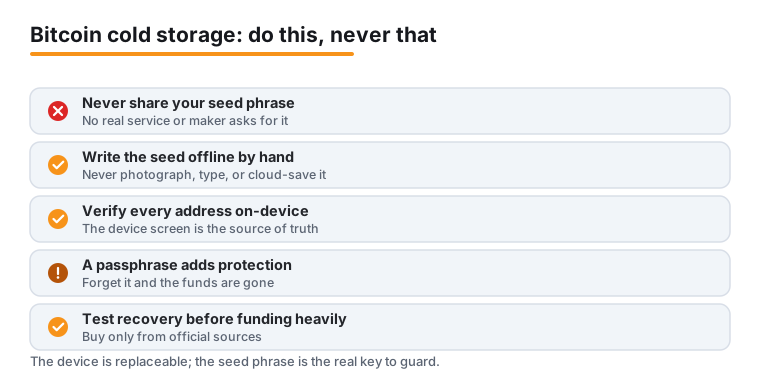
When you first set up a hardware wallet, it generates a seed phrase, also called a recovery phrase or backup phrase. This is typically 12 or 24 words drawn from the standardized BIP39 word list, and it encodes every private key the wallet will ever use. The single most important fact about cold storage is this: anyone who has your seed phrase can take all of your bitcoin, with or without the physical device. The device is replaceable; the seed phrase is the actual key to the vault.
Because of that, the seed phrase must be recorded offline and protected as carefully as the funds themselves. Practical rules:
- Write the words by hand on the supplied card the moment the device shows them, in the exact order, and double-check spelling. Do not photograph them, type them into any app, store them in a password manager, email them to yourself, or save them in the cloud. The instant a seed touches an internet-connected device, it is no longer cold.
- For meaningful amounts, copy the seed onto a metal backup (a stamped or tiled steel plate). Paper burns, fades, and dissolves; a fireproof, waterproof metal backup survives household disasters.
- Store the backup somewhere private and secure, and consider a second copy in a separate location (for example a safe deposit box) so a single fire, flood, or theft cannot wipe out your only record.
- Never enter your seed phrase into a website, a pop-up, a "wallet validation" tool, or a customer-support chat. No legitimate service, and no real hardware-wallet maker, will ever ask for your seed phrase. Any request for it is a scam, full stop.
Two optional features add protection on top of the seed. A PIN locks the physical device and, on most wallets, triggers a wipe after a set number of wrong guesses, defeating casual theft. An optional passphrase (sometimes called the "25th word") is an extra secret you choose; combined with the seed it derives a separate hidden wallet. A passphrase means that even someone who finds your written seed cannot access the protected funds without also knowing the passphrase, but if you forget it the funds are unrecoverable, so it must be backed up just as carefully and separately from the seed.
Setup best practices
A hardware wallet only protects you if it is set up and used correctly. Most failures are not broken chips, they are human mistakes: a seed photographed and synced to the cloud, a counterfeit device, or an address that was never checked on-screen. Follow these practices from day one.
- Buy from official sources. Purchase directly from the manufacturer or an authorized reseller, never from a third-party marketplace listing, an auction site, or a stranger. A tampered or pre-initialized device can be engineered to leak your keys. If a wallet arrives with a seed phrase already filled in, or pressures you to use a "pre-set" recovery sheet, stop, it is compromised. You always generate the seed yourself, on the device.
- Verify firmware and authenticity. On first use, let the official companion app check that the firmware is genuine and current, and install updates only through that app. Keep firmware up to date so known vulnerabilities are patched.
- Generate and record the seed offline. Let the device create the seed, write it down by hand, and confirm it. Do not skip the confirmation step the device asks for.
- Always verify the receive address on the device. When receiving bitcoin, confirm that the address shown in your software exactly matches the address displayed on the hardware wallet's own screen. This is your defense against malware that silently swaps in an attacker's address.
- Confirm every send on-device. Read the amount and destination address on the device screen before approving. The connected computer can lie; the device's own display is the source of truth.
- Set a strong PIN and never store it with the device or the seed backup.
- Test your recovery before funding heavily. Once set up, practice restoring the wallet from your written seed (on the same device after a reset, or on a compatible spare). A backup you have never tested is a backup you cannot trust. Do this before moving significant funds.
- Keep your setup private. Do not advertise how much you hold or what wallet you use. Beware "support" agents in chats, DMs, or fake apps, real support never needs your seed or remote access to your wallet.
Done well, cold storage gives you bank-vault-grade control over your bitcoin with no third party to trust. The technology is mature and the devices are affordable relative to what they protect; the remaining risk is almost entirely about disciplined habits, guard the seed, verify on-device, and test your recovery.
Frequently asked questions
What is the difference between a hot wallet and cold storage?
A hot wallet keeps your private keys on an internet-connected device such as a phone app or an exchange account, which is convenient but exposed to malware, phishing, and remote breaches. Cold storage keeps the keys completely offline, typically on a hardware wallet, so remote attackers cannot reach them. Hot wallets suit small, everyday amounts; cold storage suits savings and larger long-term holdings.
If I lose my hardware wallet, do I lose my bitcoin?
No, as long as you have your seed phrase. The hardware wallet is just a tool that stores the keys; the seed phrase is the actual backup. You can buy a new compatible device, enter your recorded seed, and your funds reappear. This is also why the seed must be protected so carefully: anyone who finds it can restore your wallet and take the coins, even without your device.
Is it safe to type my seed phrase into a website or app to verify it?
Never. No legitimate wallet, exchange, or support service will ever ask for your seed phrase, and any site, pop-up, or chat that requests it is a scam designed to steal your bitcoin. Your seed should only ever be entered directly on a hardware wallet's screen during setup or recovery, never on an internet-connected computer or phone.
Which hardware wallet is the best?
There is no single best wallet, only the right trade-offs for your needs and threat model. Compare devices on concrete attributes: whether they use a secure element, whether the firmware is open-source, whether they support air-gapped signing and multisig, and whether they show transaction details on their own screen. Reputable, widely reviewed options include Ledger, Trezor, BitBox, and Coldcard. Always buy from the official source and confirm current pricing and supported features on the manufacturer's website.
What is a passphrase, and do I need one?
A passphrase, sometimes called the "25th word," is an optional extra secret you choose that combines with your seed to create a separate hidden wallet. It adds strong protection: even someone who finds your written seed cannot access passphrase-protected funds without also knowing the passphrase. The trade-off is that if you forget it, those funds are permanently lost, so it must be backed up carefully and stored separately from the seed. It is valuable for larger holdings but optional for beginners.
Last updated: 2026-06.