Bitcoin Wallets: Types & How to Choose
A Bitcoin wallet does not actually "hold" your coins. Your bitcoin only ever exists as entries on the blockchain. What a wallet stores are the private keys that prove you own those entries and authorise you to spend them. That single fact changes how you evaluate every wallet: the question is not "where are my coins kept?" but "who controls the keys, and how exposed are they?"
This guide covers the main wallet types, hot versus cold storage, custodial versus self-custody, and how to choose. It is educational information only, not financial, legal, or tax advice; confirm anything affecting your money or compliance with the relevant provider or a qualified professional.
Types of Bitcoin wallet
Wallets differ mainly in where the private keys live and how you interact with them. The categories overlap, so one product can belong to several groups.
Software wallets (desktop and mobile)
These are apps that run on a phone or computer and store keys on that device. Mobile wallets are convenient for everyday spending and QR-code payments; desktop wallets often add advanced features such as coin control, custom fees, and connecting to your own node. Because the device is usually online, the keys are exposed to malware and remote attacks, so software wallets suit working balances rather than long-term savings.
Web and exchange wallets
Accessed through a browser or exchange account, these are the easiest to start with but often the least secure for self-storage, because the keys are typically held by the provider, not you (see custodial wallets below).
Hardware wallets
A hardware wallet is a dedicated physical device that generates and stores private keys in a chip that never exposes them to your computer. Transactions are signed inside the device and only the signed result leaves it, so even a compromised computer cannot extract the keys. Well-known options in 2026 include devices from Ledger, Trezor, BitBox, and the Bitcoin-only Coldcard; they are the mainstream choice for storing meaningful amounts. Specifications and prices change often, so check the official site and buy only from the manufacturer or an authorised reseller.
Paper wallets
A paper wallet is a printed record of a private key and its matching address, generated offline. Once popular, paper wallets are now generally discouraged for newcomers: they are easy to create insecurely, awkward to spend from without exposing the key, and vulnerable to fire, water, and fading. A modern alternative is to write down a standardised recovery phrase (the backup most wallets produce) and, for durability, stamp it into a metal backup plate. If you do use paper, the security steps below still apply.
| Wallet type | Key control | Best for | Main risk |
|---|---|---|---|
| Mobile/desktop software | You | Daily spending, small balances | Malware, device theft |
| Hardware | You | Savings, larger balances | Physical loss, phishing during use |
| Exchange/web (custodial) | Provider | Trading, beginners | Provider failure or hack |
| Paper / metal backup | You | Long-term cold storage | Physical damage, insecure creation |
Hot vs cold wallets
The most useful way to classify wallets is by internet exposure, which drives most of the real-world security difference between products.
What "hot" and "cold" mean
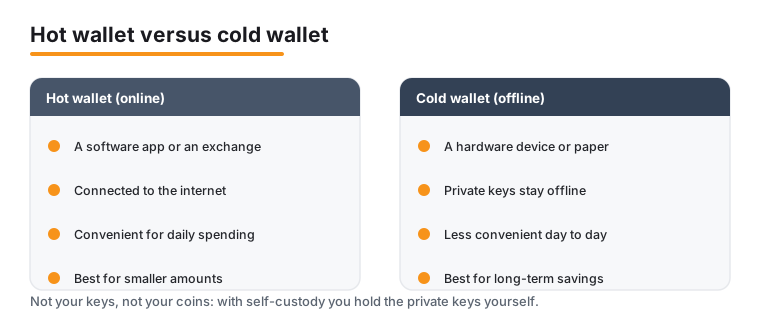
A hot wallet keeps its private keys on an internet-connected device. Mobile apps, desktop apps, web wallets, and exchange accounts are all hot. The benefit is convenience: you can send and receive at any time. The cost is a larger attack surface, because anything that can reach your device or account over the network is a potential threat.
A cold wallet keeps its keys offline. Hardware wallets, an offline computer, and paper or metal backups are cold. Because the keys never touch an online machine in plain form, remote attackers have far less to work with; the trade-off is that spending requires a deliberate, physical step.
How to split your holdings
Most people do not have to choose one or the other. A common pattern mirrors cash and a bank: keep a small "spending" balance in a hot wallet, and keep the bulk of your savings in cold storage, moving funds across only as needed. This limits how much is ever at risk to an online compromise while keeping daily use practical. Note that a desktop wallet on a sometimes-online computer is still effectively hot; true cold storage means the signing keys never exist on a networked device in usable form.
Custodial vs self-custody
Beyond where keys are stored, the deeper question is who holds them. This determines who can actually move your bitcoin and what happens if something goes wrong.
Custodial wallets
With a custodial wallet, a third party such as an exchange or broker holds the private keys for you. You log in with a username and password and instruct the provider to move funds. The advantages are real: easy setup, password recovery if you forget your login, and integrated buying and selling. So are the drawbacks. You are trusting the provider to stay solvent, secure, and accessible; if it is hacked, becomes insolvent, or freezes your account, your access can be affected even though you did nothing wrong. The phrase "not your keys, not your coins" captures this: you hold a claim against a company, not direct control of the bitcoin itself.
Self-custody wallets
With a self-custody (non-custodial) wallet, you alone hold the private keys, usually backed up as a recovery phrase. No company can freeze your funds or lock you out, but responsibility is entirely yours: no support line can reset a lost recovery phrase, and an irreversible transaction sent to the wrong address generally cannot be undone. Self-custody offers maximum control in exchange for maximum personal responsibility.
Which to use
Many people use both: a regulated custodial account for buying and trading, and a self-custody wallet for funds they intend to hold. As balances grow, the case for self-custody strengthens, because concentrating value with any single third party is itself a risk. Custodial providers may also have verification, reporting, or withdrawal rules that vary by provider and jurisdiction, so review the terms of any service you use.
How to choose
There is no single "safest" wallet for everyone; the right choice depends on how much you hold, how often you transact, and how much responsibility you want. Work through the questions below rather than chasing a ranking.
Match the wallet to the job
- Amount at stake. Small, actively used balances can sit in a reputable mobile or desktop wallet; savings you would hate to lose belong in cold storage, ideally a hardware wallet.
- Frequency of use. Frequent spenders value a hot wallet's speed; long-term holders should accept the slower, safer friction of cold storage.
- Custody preference. Decide whether you want a provider to share the burden (custodial) or sole control (self-custody), and be honest about your ability to safeguard a backup forever.
- Technical comfort. Hardware wallets are within reach of non-technical users who follow the setup guides. If that feels daunting, start small and learn before moving large amounts.
Signs of a trustworthy wallet
- Active development and a recent update history.
- A clear, public security model; open-source code is a plus because it can be independently reviewed.
- For self-custody, a standard recovery phrase you control and can back up yourself.
- An established reputation, rather than anonymous, brand-new software promoted aggressively.
Common mistakes to avoid
- Choosing a wallet only on someone else's recommendation, without checking it fits your needs and is the genuine, official product.
- Skipping the backup. If you cannot restore your wallet from its recovery phrase on another device, you do not really have a backup.
- Storing the recovery phrase digitally. Screenshots, cloud notes, photos, and emails are exposed to malware and breaches. Keep it offline on paper or metal; never type it into a website.
- Trusting any wallet that asks for your recovery phrase to "validate" or "unlock" funds. That is a hallmark of a scam.
Security best practices
The wallet you choose matters less than how you operate it, because most losses come from human error, phishing, and weak backups rather than broken cryptography. The same fundamentals protect every wallet type.
Protect the recovery phrase above all
Your recovery phrase (a standardised list of words, commonly twelve or twenty-four) can regenerate every key in the wallet. Anyone who reads it controls your funds; anyone who loses it loses access. Write it down by hand, store copies in separate secure locations, and consider a metal backup for fire and water resistance. Never store it as a digital file, and never share it with anyone, including "support staff," who are impersonators if they ask for it.
Layer your defences
- Strong, unique passwords for any wallet or exchange account, kept in a reputable password manager rather than reused across sites.
- Two-factor authentication (2FA) on custodial and exchange accounts; an authenticator app or security key resists interception better than SMS codes.
- Keep software updated. Wallet apps, device firmware, and operating systems receive security patches; running current versions closes known holes.
- An optional passphrase (sometimes called a "25th word") adds a second secret on top of a hardware wallet's recovery phrase. It increases security but also the chance of permanent loss if forgotten, so it suits experienced users with a robust backup plan, not beginners.
Defend against scams and theft
- Verify the receiving address on the wallet's own screen before sending; malware can swap an address copied to the clipboard.
- Beware phishing. Do not click links in unsolicited messages, and reach wallet or exchange sites by typing the address yourself. Treat "too good to be true" offers, urgent pressure, demands for crypto payment, and shared or public computers for significant transactions as red flags.
- Buy hardware wallets only from the manufacturer or an authorised reseller and set them up yourself. A pre-filled recovery phrase that arrives with a device is a known scam.
Frequently asked questions
Where are my bitcoins actually stored?
On the Bitcoin blockchain, not inside any wallet. Your wallet stores the private keys that prove ownership and let you authorise transactions. "Holding" bitcoin really means safeguarding those keys, which is why key management is the heart of wallet security.
Is a hardware wallet worth it for a small amount?
For very small, frequently spent balances, a reputable mobile or desktop wallet is usually enough. As your holdings grow into amounts you would be upset to lose, a hardware wallet's offline key storage becomes a sensible investment. Many people use a hot wallet for spending and a hardware wallet for savings.
What happens if I lose my recovery phrase?
For a self-custody wallet, losing the recovery phrase typically means losing access permanently, because no company can reset it for you. That is why redundant offline backups are essential. Equally, anyone who finds your phrase can take your funds, so it must be both safe and secret.
Are exchange wallets safe to store bitcoin long term?
Exchanges are convenient for buying and trading, but storing long-term savings there means trusting the company to stay solvent, secure, and accessible, and history includes exchange hacks and failures that affected customer funds. Many holders keep only trading balances on exchanges and move longer-term holdings into self-custody.
Can I undo a Bitcoin transaction sent to the wrong address?
Generally no. Confirmed Bitcoin transactions are irreversible, and there is no central authority to reverse them. Always double-check the receiving address on your wallet's screen before sending, and send a small test amount first when using a new address.
Last updated: 2026-06.