How to Move Crypto Between Exchanges (Without Losing It)
Moving crypto from one exchange to another, or from an exchange to a wallet you control, is a routine task once you know the order of the steps. The risk is not that it is hard. The risk is that a single wrong detail, like the wrong network or a missing tag, can leave your funds stuck or gone, and no one can reverse it for you.
This guide walks through the safe procedure in plain English: where to start, what to copy, what to double-check, and why a small test amount first is worth the few extra minutes. It is written for ordinary people moving coins between accounts they own. This is educational information, not financial advice.
Start on the receiving side, not the sending side
It is tempting to begin where your coins are, on the exchange you are sending from. Do the opposite. Begin on the exchange or wallet you are sending to, because that is where you learn the exact details the transfer needs.
The receiving side decides three things: which coin it can accept, which networks it supports for that coin, and the deposit address (plus a memo or tag, if the coin needs one). You cannot fill in the sending screen correctly until you have those details in front of you. Working in this order also stops a common mistake, which is picking a network on the sending side that the receiver does not actually support.
So open the receiving account first, find its Deposit or Receive screen, and get the details before you touch the funds. If you are still deciding which chain to use, our guide on choosing the right network compares the common options.
Pick the exact coin and a supported network
On the receiving Deposit screen, select the exact coin you plan to move. Be precise here. USDT and USDC are different tokens, and many coins exist on several blockchains at once, so the coin you pick and the network you pick are two separate choices.
After the coin, choose the network. This is the blockchain your funds will travel on, and it must be one that the sending exchange also offers for that same coin. The coin and network selected on the sending side must match a network the receiving side supports; a mismatch can leave funds stuck or lost. If the receiving side lists several networks, note which ones, so you can pick a shared option later when you set up the withdrawal.
The network is not decided by the address alone. Some chains use addresses that look almost identical, so the only reliable way to set the chain is the network selector itself. Read it carefully on both screens before going further.
Copy the deposit address and the memo or tag
Once the coin and network are set, the receiving side shows a deposit address, usually as a long string and a QR code. Copy it exactly. Do not type it by hand. For some coins, the screen also shows a second field called a memo or destination tag, and that field is just as important as the address.
Certain coins almost always need this extra field for exchange deposits. XRP, Stellar (XLM), Cosmos (ATOM), Hedera (HBAR), and EOS commonly require a memo or destination tag, because the exchange uses one shared deposit address for all of its users. The tag is how the exchange knows which customer account the deposit belongs to. If the memo or tag is missing or wrong, the funds may not be credited and can be permanently lost. Exchanges publish their own instructions; for example, see the Crypto.com Help Center for XRP and XLM.
If a memo or tag field appears, treat it as required, copy it exactly, and keep it next to the address so you can paste both on the sending side. Do not leave it blank, and never invent a value.
The core transfer: step by step
With the receiving details in hand, switch to the sending exchange and open its Withdraw screen. Work through these steps in order, and do not rush any of them.
- On the sending side, open Withdraw and select the same coin you set up on the receiving side.
- Select the same network. It must match the network you chose on the receiving deposit screen exactly.
- Paste the deposit address, and paste the memo or destination tag into its own field if the coin uses one.
- Double-check both. Read the whole address, not just the first and last characters, and confirm the tag matches.
- Note the withdrawal fee and any minimum amount before you confirm the figure you are sending.
- Send a small test amount first, then wait.
- Wait for the required confirmations and confirm the test credited on the receiving side.
- Once the test arrives, send the rest to the same address and tag.
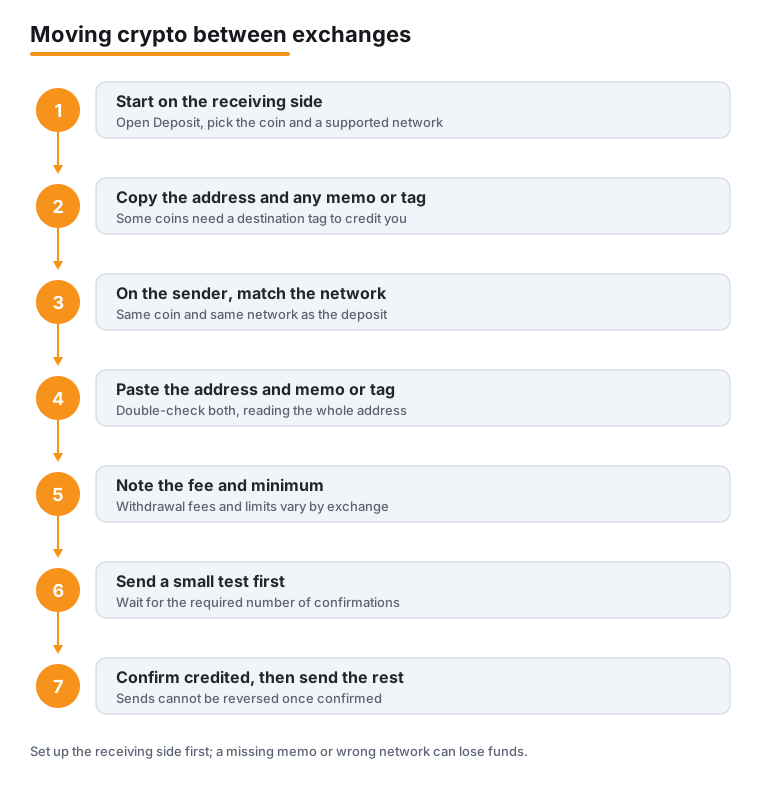
The two steps people skip most are matching the network on both sides and sending a test first. Both are cheap insurance against an expensive mistake. For a deeper walkthrough of the general send process, see our guide on sending crypto safely.
Why the test amount matters so much
Crypto transfers cannot be reversed once they are confirmed. There is no chargeback and no support line that can pull the funds back. That is exactly why you always send a small test amount to a new address first, before committing the full balance.
A test costs you only the withdrawal fee, and it proves the entire path works: the right coin, the right network, the correct address, and the correct tag if one is needed. If you got a detail wrong, you lose a small amount instead of everything. If everything is right, the test arrives and you can finish the transfer with confidence.
Wait until the test actually shows up in the receiving account, not just until the sending side says it was sent. A confirmed arrival is the only proof that matters. You can track progress yourself on a blockchain explorer; the Etherscan Information Center explains how to read these records, and our walkthrough on reading a blockchain explorer covers the same idea in plain English.
Fees, minimums, and limits
Exchanges charge a withdrawal fee, often a flat network fee, and they set a minimum withdrawal amount for each coin and network. They also apply daily or monthly limits. Those limits often start low and rise only after you complete higher verification tiers, so a large transfer may be capped until your account is verified further.
Check three numbers before you confirm: the fee, the minimum, and your remaining limit for the period. The fee is deducted from or added to the amount, depending on the platform, so the figure that leaves your account may differ from what you typed. The minimum matters for your test amount too, because a test below the minimum will be rejected. Fee schedules differ between platforms; for example, Coinbase publishes its own.
Network fees vary with congestion, and the cheapest acceptable network is the one both sides support. Picking a low-fee chain only helps if the receiving side actually lists it for your coin, so matching always comes before saving on fees.
Security: 2FA, whitelisting, and first-time checks
A withdrawal is the moment an attacker most wants to control, so exchanges add friction on purpose, and you should use every layer offered. Turn on two-factor authentication for your account and for withdrawals specifically. Where it is available, enable address whitelisting, which limits withdrawals to a short list of addresses you approved in advance.
Expect extra friction the first time you send to a new destination. A first withdrawal to a newly added address often triggers extra checks or a short hold while the exchange confirms the request is really from you. This is normal and protective, not a sign of a problem. Plan for it rather than rushing, especially if you are moving funds under any time pressure.
Treat any urgency as a warning sign. Scammers push people to disable safety features or skip the test step. If you want help telling a real platform from a fake one, see our guide on spotting a fake crypto exchange before you send anything.
What to do if something goes wrong
If you sent a tag coin without the memo or tag, the funds may sit uncredited rather than truly vanish, and recovery is sometimes possible. It usually means opening a support ticket with the transaction ID. The exchange may ask for a second small deposit from the same address with the correct tag to prove ownership. The process can take weeks to months, some exchanges charge a recovery fee, and it is not guaranteed.
If you sent on a network the receiver does not support, the outcome is harder. The transaction often looks successful on the blockchain but lands on a chain the receiving side is not watching, and there is frequently nothing the receiver can do. Recovery, where it exists at all, is slow and not promised. This is why the network match and the test amount come first.
For long-term savings, the safer home is a self-custody wallet, where you hold the keys, rather than leaving coins on any exchange. If a transfer has already gone wrong, our explainer on what to do after you sent crypto to the wrong address sets honest expectations about your options.
Frequently asked questions
Should I set up the sending side or the receiving side first?
Start on the receiving side. Open its Deposit screen, pick the exact coin and a supported network, and copy the deposit address plus any memo or tag. Only then switch to the sending exchange's Withdraw screen. Working in this order means you fill in the withdrawal with details you have already confirmed, instead of guessing.
What is a memo or destination tag, and which coins need one?
It is an extra identifier some networks require for exchange deposits, including XRP, Stellar (XLM), Cosmos (ATOM), Hedera (HBAR), and EOS. The exchange shares one deposit address across all users, so the tag tells it which account a deposit belongs to. If the deposit screen shows a memo or tag field, copy it exactly and treat it as required. Leaving it out can lose the funds.
Why does the network have to match on both sides?
Because a coin can travel on several different blockchains, and the receiving side only watches the networks it supports for that coin. If you withdraw on a network the receiver does not support, the funds can be stuck or lost even though the address looked valid. Match the network on the sending and receiving screens before you confirm anything.
Do I really need to send a test amount every time?
Send a test for any new address or any transfer that matters. Crypto transfers cannot be reversed once confirmed, so a small test is cheap insurance. It proves the coin, network, address, and tag are all correct before you commit the full balance. Wait until the test actually shows up in the receiving account before sending the rest.
What can I do if I forgot the memo or tag, or used the wrong network?
For a missing tag, recovery is sometimes possible by opening a support ticket with the transaction ID; the exchange may ask for a second small deposit from the same address with the correct tag to prove ownership. It can take weeks to months, may carry a fee, and is not guaranteed. For a wrong network, the funds are often unrecoverable, especially if the receiver is an exchange that does not support that chain.
Is it better to keep coins on an exchange or move them to a wallet?
For long-term savings, a self-custody wallet where you hold the keys is the safer home than leaving coins on any exchange. Exchanges are convenient for trading, but you do not control the keys there. The same transfer procedure applies when moving to your own wallet: match the network, copy the address and any tag, send a test first, then send the rest.
Last updated: 2026-06.
Related guides
- How to Read a Blockchain Explorer and Track Your Transaction
- How to Read a Crypto Whitepaper Before You Buy
- How to Send Crypto Safely: A Step-by-Step Guide
- How to Set Up 2FA and Stop SIM-Swap Attacks
- How to Set Up a Hardware Wallet (Ledger or Trezor), Step by Step
- How to Set Up a Self-Custody Wallet
- Crypto Scams and Fraud: How to Stay Safe