How to Choose the Right Network When Sending Crypto (ERC-20 vs TRC-20 vs BEP-20)
Sending crypto feels like sending an email, but it is closer to mailing a package: the address matters, and so does the delivery service you choose. The single most common way people lose coins is not getting scammed. It is picking the wrong network when withdrawing, so the funds land on a blockchain the receiver cannot see.
This guide explains why the same coin can exist on several blockchains at once, how to match the network on both sides of a transfer, and the short checklist that keeps your money from getting stuck. It is written for ordinary people moving stablecoins or other tokens between an exchange and a wallet, or between two exchanges.
Why one coin can live on many blockchains
A coin you think of as a single thing is often a token issued separately on multiple independent blockchains. USDT (Tether) is the clearest example. It exists on more than 15 blockchains, and each copy is a distinct token that only moves on its own chain.
As of 2026, Tron holds roughly 45% of all USDT supply and Ethereum holds roughly 40%, with Solana around 6% and Layer 2 networks together around 8%. The USDT on Tron and the USDT on Ethereum are worth the same dollar, but they are not interchangeable in transit. If you send the Tron copy to a wallet that only watches Ethereum, the Ethereum wallet will never show it. You can learn more from Tether, the company that issues USDT.
This is why a withdrawal screen usually asks you to pick a network after you pick the coin. That choice decides which blockchain your money travels on, and it cannot be undone once the transaction is sent.
What ERC-20, TRC-20, and BEP-20 actually mean
These labels name the blockchain a token lives on, nothing more.
- ERC-20 means a token on Ethereum.
- TRC-20 means a token on Tron.
- BEP-20 means a token on BNB Smart Chain.
These are different blockchains that do not talk to each other directly. A common trap is that the address format can look identical between chains. Ethereum and BNB Smart Chain both use addresses that start with 0x, so the same-looking address can be valid on two networks at once. The address alone does not tell you which chain the funds will arrive on. The network selector does. That is why you must read the network field, not just paste an address that looks right.
The networks you will see most often
Here is a plain comparison of the common rails for sending crypto. Fees move with congestion, so treat these as general patterns rather than fixed numbers.
| Network | Speed | Typical fee | When it tends to be used |
|---|---|---|---|
| Ethereum (ERC-20) | Minutes | Usually the highest of the group, varies with congestion | Institutions, many exchanges, and tokens that only live here |
| Tron (TRC-20) | Seconds to minutes | A fraction of a US dollar | Everyday USDT transfers; very widely supported |
| BNB Smart Chain (BEP-20) | Seconds to minutes | Low, typically well under a dollar | Tokens and apps in the BNB ecosystem |
| Solana | Seconds | A fraction of a US dollar | Fast, cheap USDT and other transfers |
| Layer 2s (Arbitrum, Base, Optimism) | Seconds to minutes | A fraction of a US dollar | Cheaper Ethereum-style transfers, when both sides support that L2 |
Tron and Solana are the most used rails for everyday USDT transfers because fees stay very low. Ethereum mainnet is common for institutions and exchanges, but its fees are usually the most expensive of the group. The cheapest network is only useful if the receiver actually supports it.
The core procedure: how to pick and match the network
Work through these steps in order every time you send. The whole point is to choose a network that both sides support, then confirm with a tiny test before committing the full amount.
- Decide the coin. Confirm exactly which asset you are sending (for example USDT, not USDC).
- Check which networks both sides support for that coin. Look at the withdrawal screen on the sending side and the deposit screen on the receiving side. List the networks each one offers for that specific coin.
- Pick a network common to both, and choose the cheapest acceptable one. If both support Tron and Ethereum, Tron is usually far cheaper. If they share only one network, you have no choice, so use it.
- Check whether a memo or destination tag is required. Some coins and some exchange deposits need an extra tag (covered in the next section). If a field is shown, it is almost always required.
- Send a small test transfer first. Move a small amount, then wait.
- Confirm it arrived, then send the rest. Only after the test shows up in the receiving account on the right network should you send the remaining balance.
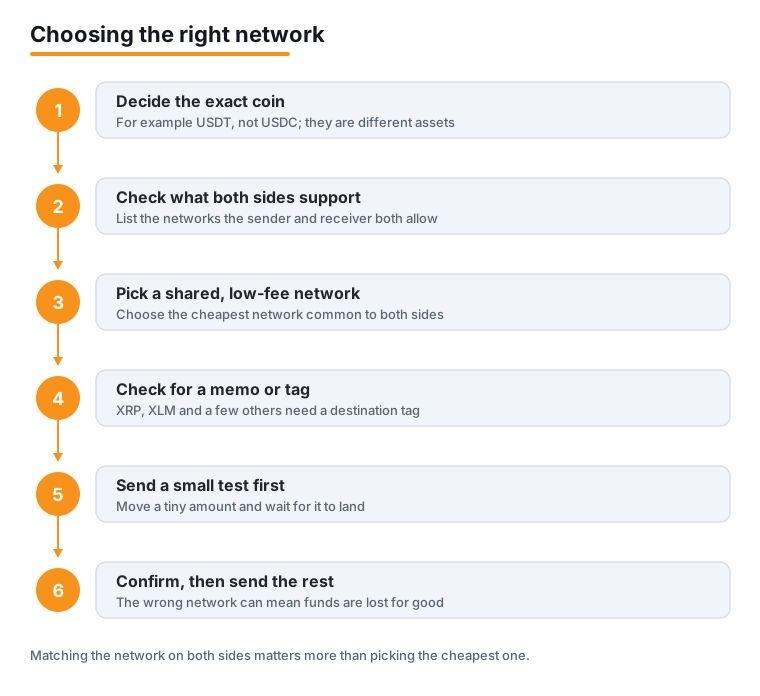
The most important line in that list is step 3: the network must appear on the receiving side too. A network that exists only on the sending side is a dead end for your funds. For a broader walkthrough of safe transfers, see our guide on how to send crypto safely.
Memo and destination tag coins
A few networks need a second piece of information beyond the address. XRP, Stellar (XLM), EOS, Cosmos (ATOM), and Hedera (HBAR) commonly require a memo or destination tag when sent to an exchange.
The reason is that the exchange uses one shared deposit address for every customer. The memo or tag is how the exchange knows which account the deposit belongs to. Omit it and the funds can be lost, or recoverable only through a slow manual support process that is not guaranteed.
If the deposit screen shows a memo or tag field, copy it exactly and paste it into the matching field on the sending side. Do not leave it blank, and do not invent a value. Exchanges publish their own instructions; for example, see the Crypto.com Help Center for XRP and XLM. Our overview of moving crypto between exchanges covers tags in more detail.
What happens if you pick the wrong network
If you withdraw a token on a network the receiver does not support, the funds are often unrecoverable. The transaction itself usually succeeds on the blockchain, so it looks like it went through, but it lands on a chain the receiving wallet or exchange is not watching for that coin.
Recovery is sometimes possible, but only in narrow cases. The funds can occasionally be rescued if the receiver controls the private keys on that chain, because they could import those keys into a wallet that does see the right network. When the receiver is an exchange that does not support the chain, there is frequently nothing they can do, and what help exists is slow and not promised.
This is why prevention matters far more than any cure. If a transfer goes wrong despite your care, read our explainer on what to do after you sent crypto to the wrong address before taking any further action.
Fees: cheaper is good, but matching comes first
Once you know which networks both sides support, fee is the tie-breaker. Ethereum mainnet fees vary with congestion and are usually the most expensive, while Tron, Solana, and Layer 2 networks are typically a fraction of a US dollar.
The order matters: first find networks both sides accept, then pick the cheapest among them. Never pick a network just because it is cheap if the receiver cannot accept that coin on it. Saving a dollar in fees is meaningless if the whole transfer is lost.
Because USDT exists on so many chains, it usually gives you the most room to choose a low-fee rail like Tron or Solana. Our guide to understanding USDT goes deeper on the stablecoin itself, and you can compare published exchange fees, such as those listed by Coinbase. For more ways to trim costs, see our notes on lowering crypto fees.
Frequently asked questions
Is USDT on Tron the same as USDT on Ethereum?
They are both worth one US dollar and are issued by the same company, but they are separate tokens on separate blockchains. You cannot send the Tron version to an Ethereum-only wallet and expect it to arrive. To switch between them you generally use an exchange or a bridge, not a direct transfer.
The address starts with 0x, so does the network still matter?
Yes. Ethereum and BNB Smart Chain both use addresses that begin with 0x, so the same-looking address can exist on two different networks. The address does not decide which chain your funds travel on. The network selector does, which is why you must set it correctly.
What is a memo or destination tag, and when do I need one?
It is an extra identifier some networks use, including XRP, Stellar (XLM), EOS, Cosmos (ATOM), and Hedera (HBAR). Exchanges share one deposit address across all users, so the tag tells them which account a deposit belongs to. If the deposit screen shows a memo or tag field, treat it as required and copy it exactly.
Why should I send a test transfer if it costs an extra fee?
Because the small extra fee is cheap insurance. A test transfer of a small amount lets you confirm the network and any memo are correct before you commit the full balance. If something is wrong, you lose a little rather than everything.
Can I get my coins back if I pick the wrong network?
Often not. The funds are frequently unrecoverable. They can sometimes be rescued only if the receiver controls the private keys on that chain and can import them into a wallet that sees the correct network. When the receiver is an exchange that does not support that chain, recovery is usually slow or impossible, so prevention is what counts.
Which network should I use for everyday USDT transfers?
A low-fee rail that both sides support, commonly Tron or Solana, since their fees are typically a fraction of a US dollar. Always confirm the receiving wallet or exchange lists that network for USDT before sending, and run a small test first.
Last updated: 2026-06.
Related guides
- Getting Paid in Crypto: How Stablecoin Salaries Actually Work
- How to Back Up Your Seed Phrase (and Test That It Works)
- How to Buy & Sell Crypto: Step-by-Step
- How to Lower Crypto Transaction Fees
- How to Move Crypto Between Exchanges (Without Losing It)
- How to Set Up a Self-Custody Wallet
- Crypto Scams and Fraud: How to Stay Safe