How to Back Up Your Seed Phrase (and Test That It Works)
Your seed phrase (also called the recovery phrase) is the master backup of a self-custody wallet. It is a list of ordinary words that can rebuild your wallet from scratch, which is exactly why it deserves more care than almost anything else you own digitally.
Most people who permanently lose crypto do not lose it to hackers. They lose it here: a backup that was written down badly, stored in one fragile place, or never tested. This guide walks through the careful method, including the step nearly everyone skips, which is proving the backup actually works before real money depends on it.
What a seed phrase is, and why it matters
When you set up a self-custody wallet, the app generates a recovery phrase that follows an open standard called BIP-39. It is usually 12 or 24 ordinary words. Because the standard is open, the same words can restore the wallet in many different apps, not just the one you started with. A 12-word phrase gives 128 bits of security and a 24-word phrase gives 256 bits; both are far beyond anything that could be guessed.
This phrase is the whole wallet. Anyone who has it can take all the funds instantly, on any device, anywhere. And the reverse is just as important: if the phrase and the device are both lost, no company can recover the funds for you. There is no reset link and no support desk that can help. That is the trade-off of self-custody, which is covered in more depth in not your keys, not your coins.
Keep one distinction clear from the start. Your wallet's receiving address is safe to share so people can send you funds. The recovery phrase is the secret, and it is never shared with anyone, for any reason. If you have not set up a wallet yet, see how to set up a self-custody wallet first.
Before you start: a calm, private setup
Treat the backup as a small, deliberate task rather than something you rush through during setup. A few minutes of care here prevents the most common and most painful loss.
- Pick a private place with no cameras, including the camera on your own phone and laptop.
- Have good paper or a backup card and a reliable pen ready before you reveal the words.
- Close other apps and put your phone face down so nothing photographs the screen.
- Make sure you will not be interrupted, so you do not lose your place in the word list.
The goal is simple: capture the words accurately, in order, with no digital copy left behind anywhere.
Step by step: writing and storing the backup
This is the core procedure. Follow it in order and do not skip the double-check.
- Write the words by hand, in the exact order shown, and number each one from 1 onward.
- Double-check the spelling of every word against the screen. BIP-39 words are specific, and a single wrong or misread word can make the backup useless.
- Confirm the order is correct. Order matters as much as spelling.
- Make at least two copies and store them in two separate secure locations, so a single fire, flood, or theft cannot destroy every copy at once.
- For larger amounts, add a metal backup plate (see the next section).
- Never store the phrase digitally in any form. The section on the never list explains why.
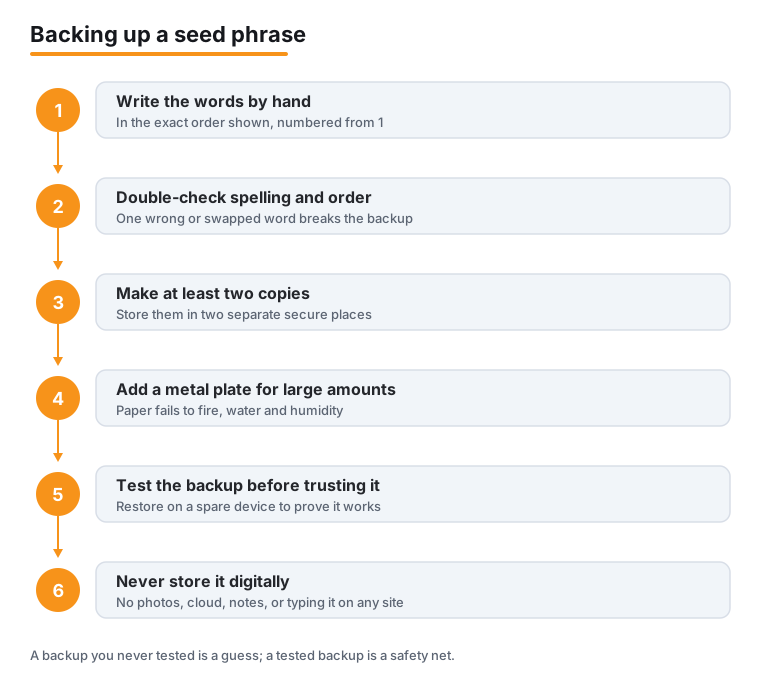
Once both copies are written and stored, you are ready for the step most people skip, which is testing. Do not move meaningful funds in until the backup has passed the test described below.
Paper, metal, and why copies live apart
Paper is fine to start with, but it is fragile. It can be destroyed by fire, water, or humidity, and ink can fade. That is why hardware-wallet makers and backup specialists sell metal plates where the words are stamped or engraved. Metal survives the conditions that ruin paper, which makes it the better choice for amounts you would be upset to lose.
Storing copies in two separate places is not about secrecy alone; it is about surviving a single disaster. If both copies sit in the same drawer, one house fire ends both. Common separate locations include a home safe and a trusted second site such as a safe deposit box or the home of someone you trust completely. Wallet makers publish their own guidance on this; for example, see Trezor and the MetaMask Help Center.
Test the backup before you trust it
A backup you have never tested is a guess, not a backup. Testing proves the words are correct and complete while the stakes are still low. Do this before any meaningful amount depends on it.
- Use a spare device, or do a factory reset of a device you control, so you are restoring from nothing.
- Choose the restore or recover option in the wallet app, not the create-new option.
- Enter the words you wrote down, in order, exactly as written.
- Confirm the same addresses appear that you had before. Matching addresses mean the backup reproduces the same wallet.
- Restore the original wallet on your main device afterward, and securely wipe the test device if it was only borrowed for this.
If the addresses do not match, stop and start the backup over from the writing step. A failed test now is a lucky escape; a failed test discovered later, when you actually need the backup, is a permanent loss. For more on what does and does not work when a phrase is missing, see lost seed phrase recovery.
The never list (digital copies and fake prompts)
A few habits cause most avoidable losses. Treat every item here as a firm rule, not a suggestion.
- Never photograph or screenshot the phrase. Photos sync to the cloud automatically, which puts your secret on someone else's server.
- Never type it into Notes, email, a password manager, a chat app, or any cloud document.
- Never enter it on a website. No real site ever needs it.
- Never read it aloud to a voice assistant or over a call.
There is one prompt pattern worth memorizing. A genuine wallet asks for the recovery phrase only when you are restoring a wallet. It never asks you to enter the phrase to verify, sync, validate, unlock, or claim anything, and no legitimate support team ever asks for it. Any message that asks for your phrase for one of those reasons is an attempt to steal your funds.
Advanced options: Shamir, the passphrase, and inheritance
Once the basics are solid, a few advanced tools exist. They add resilience but also add ways to lock yourself out, so adopt them only when you understand the trade-off.
Shamir (multi-share) backup splits the backup into several shares with a threshold needed to restore, for example any 2 of 3. One lost or stolen share does not expose the wallet, and one lost share does not destroy it. It is supported by some hardware wallets; for an overview see Trezor.
An optional passphrase, sometimes called the 25th word, creates a separate hidden wallet on top of your phrase. It adds protection, but with a sharp edge: if you forget the passphrase, those funds are unrecoverable even with the full phrase. That makes it an advanced add-on with its own risk, not something to enable casually.
Inheritance planning matters because your heirs need both the phrase and clear instructions on how to use it; the words alone, with no context, may be useless to someone who has never held crypto. Plan how trusted people would access the backup if you could not help them, without exposing it while you are alive. See crypto inheritance for approaches, and if you are using a hardware device, set up a hardware wallet covers the device side.
Frequently asked questions
What is the difference between my seed phrase and my wallet address?
Your wallet's receiving address is public and safe to share so people can send you funds. Your recovery phrase is the secret that controls the whole wallet and is never shared with anyone. Sharing the address is normal; sharing the phrase gives away everything.
Why should I test my backup if I already wrote it down carefully?
Because careful writing still leaves room for a misspelled word, a wrong order, or a smudged letter, and you will not notice until you try to restore. Testing on a spare device or after a factory reset confirms the same addresses appear, proving the backup works while no real money is at risk yet.
Can I just save my seed phrase in a password manager or photo for convenience?
No. Photos sync to the cloud, and a password manager, note, email, or chat all create a digital copy that can be breached or synced off your device. The phrase should live only on paper or metal, never typed into any app, website, or cloud document.
A wallet or support agent is asking for my recovery phrase. Is that normal?
No. A genuine wallet asks for the recovery phrase only when you are restoring a wallet, never to verify, sync, validate, or claim anything, and no legitimate support team ever asks for it. Any such request is an attempt to steal your funds, so do not enter or send the phrase.
Is 12 words less safe than 24 words?
Both are far beyond what anyone could guess. A 12-word BIP-39 phrase gives 128 bits of security and a 24-word phrase gives 256 bits. For most people the practical risk is losing or exposing the phrase, not someone guessing it, so good storage and a tested backup matter more than the word count.
What happens if I lose my phrase and my device at the same time?
The funds are gone, and no company can recover them. That is the nature of self-custody: you hold the only key. This is exactly why you keep at least two copies in separate secure locations and test them before trusting them with real money.
Last updated: 2026-06.
Related guides
- How to Choose the Right Network When Sending Crypto (ERC-20 vs TRC-20 vs BEP-20)
- Getting Paid in Crypto: How Stablecoin Salaries Actually Work
- How to Buy & Sell Crypto: Step-by-Step
- How to Lower Crypto Transaction Fees
- How to Move Crypto Between Exchanges (Without Losing It)
- How to Set Up a Self-Custody Wallet
- Crypto Scams and Fraud: How to Stay Safe