How to Set Up 2FA and Stop SIM-Swap Attacks
A password alone is no longer enough to protect an email account, a crypto exchange login, or a wallet dashboard. Two-factor authentication (2FA) adds a second check on top of your password, so a stolen or guessed password is not enough by itself. The catch is that not all 2FA is equally safe. The most common method, a code sent by text message, is also the weakest, and it is the one attackers target with a trick called a SIM swap.
This guide explains the ladder of 2FA strength in plain English, shows you what a SIM swap actually is, and walks through a clear procedure to harden your accounts. The goal is simple: keep the second factor on something an attacker cannot reach by phoning your mobile carrier.
What 2FA is and why it matters
Two-factor authentication means you prove who you are with two separate things: something you know (your password) and something you have (a code or a key). If someone steals your password in a data breach or through a phishing page, the second factor is meant to stop them from logging in.
This matters most for accounts that hold money or control other accounts. A crypto exchange, a self-custody wallet interface, and above all your email all deserve a second factor. The weak point is that some second factors are far easier to steal than others, so the method you choose is the whole ballgame.
The ladder of strength: SMS, app codes, and security keys
Not all 2FA is the same. From weakest to strongest, the common methods are:
- SMS text codes. A code is sent to your phone number by text. This is the weakest option. SMS is unencrypted and exposed to network-level interception, and it is tied to your phone number, which an attacker can hijack with a SIM swap.
- Authenticator app codes (TOTP). An app on your device generates a rotating six-digit code. These codes are created on the device itself and are not tied to your phone number, so a SIM swap does not capture them. This is a solid choice for most people.
- Passkeys and FIDO hardware security keys. A passkey or a physical key such as a YubiKey or Titan is the strongest method. These resist phishing because they are bound to the real website and will not hand over anything to a fake login page.
In December 2024, following the Salt Typhoon telecom intrusions, US authorities (CISA and the FBI) advised against using SMS as a second factor and recommended phishing-resistant methods. CISA considers FIDO authentication the strongest form of multi-factor authentication.
What a SIM swap actually is
A SIM swap is when an attacker convinces or bribes your mobile carrier to move your phone number onto a SIM card they control. Once your number is on their device, every text message meant for you, including 2FA codes and password reset links, arrives on the attacker's phone instead of yours. From there they can reset passwords and walk into accounts that rely on SMS.
This is not rare. The FBI's Internet Crime Complaint Center reported more than 2,000 SIM-swap complaints in 2023, with losses exceeding 72 million USD. The full figures are in the FBI IC3 2025 Annual Report. Because the whole attack runs through your phone number, the defense is to stop using your phone number as a second factor wherever you can. For more on what to do after an account is compromised, see what to do if your crypto wallet is hacked.
How to set up strong 2FA, step by step
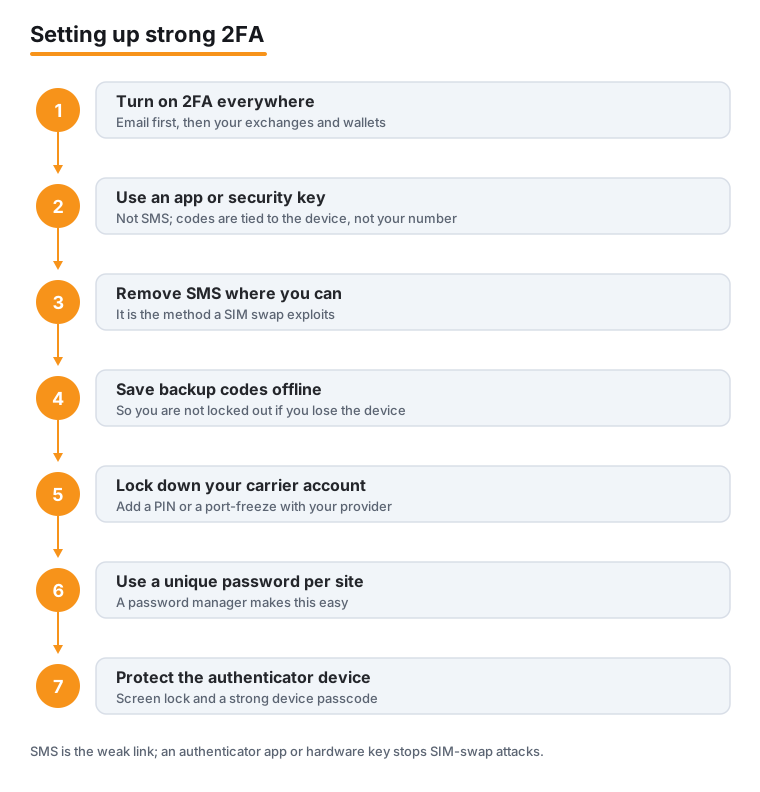
Here is the core procedure to harden your accounts. Work through it in order, starting with the account that protects all the others.
- Turn on 2FA everywhere important. Start with your email, then your crypto exchanges and wallet logins. Email comes first because it can reset almost everything else.
- Use an authenticator app or a hardware security key, not SMS. Choose a TOTP app or a FIDO key as your primary second factor.
- Remove SMS as a 2FA method wherever the account lets you. If SMS stays enabled as a fallback, a SIM swap can still bypass your stronger method.
- Save backup and recovery codes offline. Write them down or store them somewhere not connected to the internet, never in plain text in the cloud.
- Add a PIN or port-freeze to your mobile carrier account. This makes an unauthorized SIM change much harder for an attacker to pull off.
- Use a unique password per site through a password manager. Reused passwords mean one breach unlocks many accounts.
- Protect the authenticator device itself with a screen lock, a strong device passcode, and up-to-date software.
Once these are in place, your accounts no longer depend on your phone number for security, which is exactly the path a SIM swap relies on.
Why email is the master key
Email is effectively the master key to your digital life. Most other accounts, including exchanges and many wallet services, let you reset access through a link sent to your email. If an attacker controls your inbox, they can quietly take over almost everything else.
For that reason, email deserves your strongest 2FA, ideally a passkey or hardware security key. Treat it as the account you protect first and best. If you are still building out your overall setup, our guide on how to set up a self-custody wallet covers related habits, and sending crypto safely walks through the checks worth making before any transfer.
Backup codes and not locking yourself out
Strong 2FA introduces a real risk: if you lose your phone or your security key, you could lock yourself out. Backup codes (sometimes called recovery codes) solve this. They are one-time codes the service gives you when you enable 2FA, and they let you regain access if the authenticator device is gone.
Store them offline. A note in a drawer or a printed copy in a safe is fine. Storing them as a plain text file in cloud storage defeats the purpose, because anyone who reaches that storage gets your spare keys too. Where a service allows it, registering a second hardware key as a backup is an even cleaner approach than relying on codes alone.
Protecting your mobile carrier account
Even after you move away from SMS, locking down your carrier account is worth the few minutes it takes. The FTC recommends setting up a PIN or passcode on your mobile carrier account to make unauthorized SIM changes harder, and using authentication apps or security keys rather than SMS.
Call your carrier or open their app and ask for a port-out PIN or an account lock. Practical guidance on protecting yourself from SIM-swap scams is available from the FTC Consumer Advice page, and the FCC has proposed rules aimed at curbing SIM-swapping and port-out fraud.
Spotting the scams around 2FA
No legitimate service or support agent will ever ask for your 2FA code or your wallet recovery phrase. Anyone who does is trying to steal your account, full stop. A common trick is to trigger a login, then call or message you pretending to be support and ask you to read back the code that just arrived.
Treat any unexpected request for a code, a recovery phrase, or a seed phrase as an attack. For more on the patterns to watch, see our overview of crypto scams and fraud, and the FTC keeps a useful reference on FTC guidance about cryptocurrency and scams.
Frequently asked questions
Is SMS 2FA better than no 2FA at all?
Yes. SMS 2FA still stops the most basic attacks, where someone only has your password. It is far better than nothing. The problem is that it can be defeated by a SIM swap and is exposed to network-level interception, so you should move to an authenticator app or a security key as soon as you can, especially for email and crypto accounts.
What is the difference between an authenticator app and a security key?
An authenticator app generates rotating codes on your device that you type in. A hardware security key is a physical device that proves your identity when you tap or insert it. Both avoid your phone number, so both beat SMS. The key goes further by resisting phishing, because it is bound to the real site and will not respond to a fake one. CISA considers FIDO authentication the strongest form of MFA.
Can someone steal my authenticator app codes with a SIM swap?
No. Authenticator-app codes are generated on your device and are not tied to your phone number, so moving your number to another SIM does not capture them. This is the main reason to prefer an app or a security key over SMS.
What should I do if I lose my phone with my authenticator app on it?
Use the backup or recovery codes you saved offline when you set up 2FA to regain access, then remove the lost device and set up your second factor again on a new one. If you registered a second hardware key as a backup, you can sign in with that instead. This is exactly why saving recovery codes offline matters.
Why protect email more than my other accounts?
Email is effectively the master key, because most other services let you reset access through a link sent to your inbox. If an attacker controls your email, they can take over many of your other accounts in turn. Give email your strongest 2FA, ideally a passkey or hardware security key.
Will support ever ask me for my 2FA code or recovery phrase?
No. No legitimate service or support agent will ask for your 2FA code or your wallet recovery phrase. Any such request is a scam designed to take over your account or drain your wallet. Never read a code aloud or type a recovery phrase into a page or chat at someone's request.
Last updated: 2026-06.
Related guides
- How to Set Up a Hardware Wallet (Ledger or Trezor), Step by Step
- How to Stake Crypto: A Step-by-Step Beginner's Guide
- How to Swap One Crypto for Another Safely
- How to Accept Crypto Payments as a Business
- How to Choose the Right Network When Sending Crypto (ERC-20 vs TRC-20 vs BEP-20)
- How to Set Up a Self-Custody Wallet
- Crypto Scams and Fraud: How to Stay Safe