How to Read a Blockchain Explorer and Track Your Transaction
A blockchain explorer is a free public website that shows every transaction ever made on a blockchain. Anyone can use one, no account needed, and it is the single most useful tool for answering the question that haunts every newcomer: where did my crypto go, and did it arrive? Once you can read an explorer, you stop guessing and start checking.
This guide is for ordinary people, not engineers. It explains what a transaction hash, a block, and a confirmation actually are, then walks you step by step through looking up your own transaction and reading what the screen tells you. It is educational only, not financial advice.
What an explorer is, and the three words you need
Every public blockchain keeps an open record of its activity, and an explorer is simply a website that lets you search and read that record in plain layout. You do not log in and it cannot move your money. It only shows you what is already there for everyone to see.
Three words unlock the whole thing.
- A transaction hash, also called a TXID, is the unique fingerprint of one transaction. It is a long string of letters and numbers, and it is what you paste into an explorer to look up your transaction's status.
- A block is a batch of transactions that the network has grouped together and recorded permanently. Transactions wait in line, then get packed into a block.
- A confirmation means your transaction is sitting inside a block. Each later block added on top counts as another confirmation, and more confirmations mean a lower chance the transaction is ever reversed.
That is the entire vocabulary. Everything else on an explorer is detail layered on top of these three ideas. If you are still new to moving coins around, our guide to sending crypto safely pairs well with this one.
Step 1: Find your transaction hash (TXID)
You cannot look anything up without the hash, so this is always the first step. The good news is that your wallet or exchange already recorded it for you; you just have to find it.
- In a self-custody wallet, open the transaction in your history. There is usually a line labelled transaction ID, hash, or TXID, often with a small copy icon next to it. Tap to copy.
- On an exchange, open your withdrawal history and find the withdrawal. The hash is shown on the transaction's detail page, sometimes hidden behind a link named view on explorer or transaction details.
The hash is a long random-looking string. Copy the whole thing rather than typing it, because a single wrong character points to a different transaction or to nothing at all. If you only see an address and an amount but no hash, you may be looking at the wrong screen; keep digging into the specific transaction's details.
Step 2: Open the right explorer for your chain
Each blockchain has its own explorers, and a Bitcoin hash means nothing to an Ethereum explorer. Match the tool to the chain your coin actually moved on. If you are unsure which network you used, our guide on how to choose the right network explains how to tell.
- Ethereum and most tokens that live on it: Etherscan. Their Etherscan Information Center has short walkthroughs.
- Bitcoin: mempool.space or Blockstream.
- Solana: Solscan.
- Tron: Tronscan.
A safety habit worth keeping: reach explorers by typing the address yourself or using a saved bookmark. Scammers run fake lookalike explorer sites that exist only to trick you into connecting a wallet or entering a recovery phrase. A real explorer never needs either, so any explorer asking for your seed phrase is a fraud, full stop.
Step 3: Paste the hash and read the status
Here is the core procedure, the part you will repeat every time. Once you have the hash and the right explorer open, the rest takes under a minute.
- Copy your transaction hash from your wallet or exchange.
- Open the correct explorer for that chain.
- Paste the hash into the search box at the top of the page and press enter.
- Read the status field first. It tells you, in one word, what is happening.
- Then read the confirmations, the from and to addresses, the amount, and the fee.
- Match the status to the right action, covered in the next two sections.
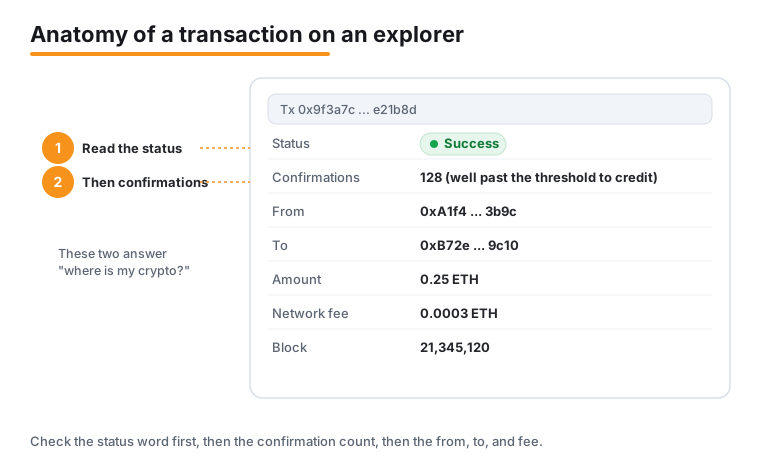
On Etherscan the status appears clearly near the top of the transaction page. It will read one of four things. Pending means the transaction is waiting to be included in a block. Success means it was included and the action completed. Failed means it was included but the action did not complete, and the fee is still spent. Dropped means it was removed from the queue, often because the fee was too low, and the funds were never sent. Etherscan's Etherscan Information Center describes each field in more depth.
Step 4: Read confirmations, addresses, amount, and fee
Once you know the status, the other fields tell you the full story of the transaction. Read them in this order.
- Confirmations. This number tells you how settled the transaction is. Zero means it is not yet in a block. One means it has just landed. The number climbs as more blocks are added on top. More confirmations mean a lower chance of reversal, which is exactly why many exchanges require a set number of confirmations before they credit a deposit to your account.
- From and to. These are the sending and receiving addresses. Check that the receiving address matches where you meant the coins to go. If you sent to an exchange, it should match the deposit address that exchange gave you.
- Amount. The quantity of crypto that moved. Confirm it matches what you intended to send.
- Fee. The network fee paid to process the transaction. This is separate from the amount sent and goes to the network, not the recipient. If you want to understand why fees vary so much, our explainer on Ethereum gas fees breaks it down, and our guide to lowering crypto fees covers how to pay less.
If everything matches and the status is Success with a healthy number of confirmations, your transaction is done. There is nothing more to do.
What each status means, and what to do
The whole reason to read an explorer is to know whether to wait, relax, or act. Here is the plain-English meaning of each status and the typical response.
- Pending. The transaction is broadcast but not yet in a block. For Ethereum in normal conditions it is usually included within seconds, but during heavy congestion it can pend for hours. The usual response is simply to wait. Refresh the page rather than sending the transaction again, because resending can create a second transaction and cost a second fee.
- Success. The transaction is in a block and the action completed. If you are waiting on an exchange deposit, watch the confirmations climb until the exchange's required number is reached, at which point it credits your account.
- Failed. On Ethereum the transaction was included but the action did not complete. A failed Ethereum transaction still costs the gas spent, because the network did the work, but the main amount is not sent. Your principal is safe; you simply lost the fee. The fix depends on why it failed, often too little gas, and usually means trying again with the right settings.
- Dropped. The transaction was removed from the queue, commonly because the fee was too low, and the funds were never sent. Nothing left your wallet. You can simply make a new transaction, ideally with an adequate fee this time.
The single most important takeaway: Failed and Dropped do not mean your main funds vanished. With Failed you lose only the fee; with Dropped you lose nothing at all.
Bitcoin: the mempool and stuck transactions
Bitcoin behaves a little differently, and mempool.space is built to show exactly how. The mempool is the waiting room of unconfirmed transactions before they are placed into a block.
On mempool.space you can see the live mempool, the current fee rates measured in sats per virtual byte, and estimated wait times. The pattern to understand is this: a transaction that paid a high fee is included quickly, while a low-fee transaction can wait a long time, because miners tend to pick the higher-paying transactions first. Their mempool.space documentation explains the fee mechanics in detail.
So what happens to a Bitcoin transaction that never gets confirmed? Most nodes drop an unconfirmed transaction after about two weeks, which returns the coins to spendable in the sender's wallet. In other words, a truly stuck low-fee Bitcoin transaction usually resolves itself by expiring, after which you can try again with a higher fee. If a transaction is taking far longer than the estimate, the explorer's fee data tells you whether you simply underpaid.
Looking up addresses and tokens, and a privacy note
Explorers do more than track single transactions. Two other lookups are worth knowing.
- An address. Paste a wallet address instead of a hash and the explorer shows that address's current balance and its full transaction history. This is handy for checking that a deposit address has received your funds, or for reviewing your own activity in one place.
- A token contract. On chains like Ethereum, you can paste a token's contract address to see details about that token, including how many holders it has and its transfer activity. This helps you confirm you are dealing with the token you think you are.
That openness comes with a real privacy consideration. Everything on a public blockchain is visible, so looking up an address shows its full balance and history to anyone who has it. If you share an address, you are sharing a window into its activity. This is worth remembering before you post an address publicly or reuse one address for everything. When you move funds, our guide on how to move crypto between exchanges covers the practical side of doing it cleanly.
Frequently asked questions
Do I need an account to use a blockchain explorer?
No. Explorers are free public websites that simply display the blockchain's open record. You do not log in, and an explorer cannot move or touch your funds. Any site claiming to be an explorer that asks for your recovery phrase or wallet login is a scam, because a genuine explorer never needs either.
Where do I find my transaction hash?
Your wallet or exchange records it for you. In a self-custody wallet, open the transaction in your history and look for a line labelled transaction ID, hash, or TXID, usually with a copy icon. On an exchange, open your withdrawal history and the transaction's detail page. Copy the whole string rather than typing it, since one wrong character points somewhere else.
My transaction says Pending. What should I do?
Wait, and refresh the explorer page rather than resending. Pending means the transaction is broadcast but not yet in a block. On Ethereum it is usually included within seconds in normal conditions, but during heavy congestion it can pend for hours. Sending it again can create a second transaction and cost a second fee, so avoid that.
My Ethereum transaction Failed. Did I lose my money?
You lost only the fee, not your main funds. A failed Ethereum transaction was included in a block but the action did not complete, and it still costs the gas spent because the network did the work. The main amount was not sent, so your principal stays in your wallet. The usual cause is too little gas, and the fix is to try again with the right settings.
Why does my exchange wait before crediting my deposit?
Exchanges wait for a set number of confirmations to lower the chance the transaction is reversed. A confirmation means your transaction is in a block, and each later block adds another. Until the exchange's required number is reached, the deposit shows as pending. You can watch the confirmations climb on the explorer in the meantime.
Can other people see my transactions on an explorer?
Yes. Everything on a public blockchain is visible to anyone. If someone has your wallet address, they can look it up and see its full balance and complete transaction history. This is a genuine privacy consideration, so think before posting an address publicly or reusing a single address for everything you do.
Last updated: 2026-06.
Related guides
- How to Read a Crypto Whitepaper Before You Buy
- How to Send Crypto Safely: A Step-by-Step Guide
- How to Set Up 2FA and Stop SIM-Swap Attacks
- How to Set Up a Hardware Wallet (Ledger or Trezor), Step by Step
- How to Stake Crypto: A Step-by-Step Beginner's Guide
- How to Set Up a Self-Custody Wallet
- Crypto Scams and Fraud: How to Stay Safe