Bitcoin Payments, Fees & Spending
Bitcoin started as a way to send money directly between people without a bank in the middle, and that original purpose is still its most practical everyday use. Whether you are paying a merchant, tipping a creator, settling an invoice, or just moving funds between your own wallets, it helps to understand what actually happens when you press send, what the fee pays for, and how long you should wait before treating a payment as done.
This guide explains how Bitcoin payments work in plain terms, why fees rise and fall, how to spend at merchants both online and in person, and what transaction confirmations really mean. It covers on-chain payments and faster off-chain options such as the Lightning Network. Nothing here is financial, legal, or tax advice; rules and tax treatment vary by country, so verify specifics with official sources or a qualified professional in your jurisdiction.
How Bitcoin payments work
A Bitcoin payment is a signed instruction that reassigns ownership of coins from one address to another. When you send bitcoin, your wallet builds a transaction, signs it with your private key to prove you control the funds, and broadcasts it to the network. Computers running Bitcoin software (nodes) check that the transaction is valid, and miners then include it in a block that is added to the blockchain roughly every ten minutes on average.
A few ideas make the rest of this guide easier to follow:
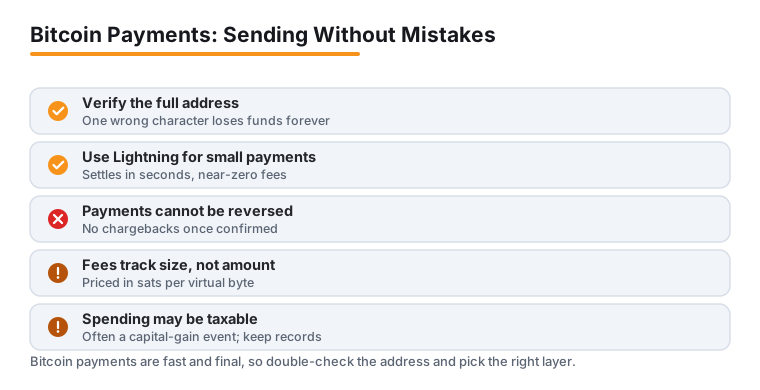
- Addresses, not accounts. Bitcoin does not use named accounts. You send to an address (often shown as a long string or a QR code). Always copy the full address or scan the code; a single wrong character sends funds somewhere unrecoverable.
- Inputs and outputs. Wallets spend coins as discrete chunks called UTXOs (unspent transaction outputs). A payment consumes one or more inputs and creates new outputs, including any change sent back to you. This structure is why transaction size, and therefore fees, can vary.
- Irreversibility. Once confirmed, a Bitcoin payment cannot be reversed by a bank or the network. There are no chargebacks. This is an advantage for merchants but means you must double-check the address and amount before sending.
- On-chain vs. off-chain. Payments recorded directly on the blockchain are on-chain. Faster, cheaper methods such as the Lightning Network settle most activity off-chain and only touch the main chain occasionally.
You hold and spend bitcoin through a wallet. Custodial wallets (typically on an exchange) hold the keys for you, which is convenient but means you trust a third party. Non-custodial wallets, including mobile apps and hardware devices, put you in sole control of your keys. The common phrase "not your keys, not your coins" captures the trade-off between convenience and self-custody.
Transaction fees explained
Every on-chain Bitcoin transaction includes a fee paid to the miner who confirms it. Fees serve two purposes: they compensate miners for securing the network, and they ration limited space in each block. Because block space is finite, fees work like an open auction. When many people want to transact at once, they bid higher fees to get in sooner; when the network is quiet, fees fall.
A widespread misconception is that fees are a percentage of the amount sent. They are not. A Bitcoin fee depends on the data size of your transaction, not its value, so sending a large sum can cost the same as sending a small one. Fees are quoted in satoshis per virtual byte (sats/vByte). Your total fee is roughly the fee rate multiplied by the transaction's size in virtual bytes.
Three factors drive what you pay:
- Network congestion. Pending transactions wait in each node's mempool (a holding area). When the mempool is full, fee rates climb because everyone is competing for the next block.
- Transaction size. A payment that combines many small inputs is larger in bytes and costs more than a simple one. Wallet design and your past receiving habits affect this.
- Urgency. Most wallets let you pick a priority. A higher fee rate generally means inclusion in an earlier block; a lower rate means waiting longer.
Practical ways to keep fees down:
- Use a SegWit or Taproot address. These newer address formats (often starting with
bc1) reduce the effective size of transactions, which lowers fees compared with older legacy addresses. - Time non-urgent payments. Fee rates fluctuate constantly. If a transfer is not time-sensitive, sending during quieter periods can cost noticeably less. A mempool or fee-estimator tool shows current rates.
- Let your wallet estimate, but sanity-check it. Wallets suggest a fee for a target confirmation time. During calm periods these estimates can be higher than necessary, and many wallets let you set a custom rate.
- Consolidate UTXOs when fees are low. If you tend to receive many small amounts, combining them into fewer outputs during a low-fee window makes future payments smaller and cheaper.
- Use Lightning for small or frequent payments. Moving small transactions off-chain avoids per-payment block-space competition entirely (covered below).
One more myth worth retiring: paying an extremely high fee does not make a transaction confirm faster than the next block. Once your fee rate is competitive for the next block, adding more rarely helps. If a payment does get stuck at too low a fee, some wallets support fee-bumping methods such as Replace-by-Fee (RBF) or Child-Pays-for-Parent (CPFP).
Paying merchants & online
Spending bitcoin with a merchant is usually simpler than the technology behind it. In a typical checkout, the merchant or their payment processor shows an amount, an address, and a QR code, often with a short countdown that locks in the bitcoin price for a few minutes. You scan the code with your wallet, confirm the amount and fee, and send. The processor watches the blockchain (or Lightning) for your payment and marks the order paid.
What this looks like in practice:
- In person. Point-of-sale apps generate a QR code for each sale. Scanning it fills in the address and exact amount automatically, so there is little room for error. Lightning is common here because it settles in seconds.
- Online. At an online store, choosing Bitcoin at checkout opens a payment page from the processor. You either scan the code from a desktop or tap a Lightning or on-chain payment link on mobile.
- Price locks. Because the bitcoin price moves, merchants quote in their local currency and convert at the moment of sale. The countdown exists so the quoted amount stays valid; if it expires, you simply request a fresh quote.
For businesses, accepting bitcoin generally means working with a crypto payment processor rather than handling the blockchain directly. A processor provides the checkout, generates addresses, and, if you choose, converts incoming bitcoin to your local currency immediately so you are not exposed to price swings. The integration steps are broadly the same across providers:
- Choose how you will hold funds. Decide between keeping bitcoin (self-custody or an exchange wallet) or auto-converting to fiat through the processor.
- Select a payment processor that fits your platform, supports the currencies and settlement you want, and offers the on-chain and Lightning options your customers use.
- Integrate the checkout. Most e-commerce platforms have a plugin or extension; others use a hosted checkout or an API. Add Bitcoin as a visible option at checkout.
- Test thoroughly with small real payments before going live, and confirm refunds and order statuses behave correctly.
- Secure your setup. Use strong, unique passwords and two-factor authentication, restrict who can move funds, and train staff to recognize fraud and social-engineering attempts.
Adoption has grown beyond early adopters, from independent cafes and online shops to larger retailers, often motivated by lower processing costs, the absence of chargebacks, and access to international customers. Real challenges remain: price volatility (mitigated by instant conversion), the learning curve for staff and customers, and regulatory and tax obligations that differ by country. Treat any specific market-adoption percentages you see online with caution and rely on primary sources; for tax and compliance, consult official guidance or a professional, because in many jurisdictions spending bitcoin can be a taxable event.
Speed & confirmations
After you broadcast an on-chain payment, it sits unconfirmed in the mempool until a miner includes it in a block. Each new block built on top of the one containing your transaction adds a confirmation. More confirmations make a payment progressively harder to reverse, because rewriting confirmed history would require an attacker to outpace the entire network's mining power.
Because a new block arrives about every ten minutes on average, confirmation times follow from how many you wait for. These are common conventions rather than fixed rules:
| Confirmations | Approx. time | Typical use |
|---|---|---|
| 0 (unconfirmed) | Seconds | Low-value, low-risk items where the merchant accepts some risk |
| 1 | ~10 minutes | Everyday and small purchases |
| 3 | ~30 minutes | Moderate amounts |
| 6 | ~1 hour | Large or high-value transactions; a widely used standard for near-finality |
Merchants and exchanges set their own thresholds based on the value at stake and their risk tolerance, so the number required can differ from one service to the next. Block times also vary around the ten-minute average, so a single confirmation can occasionally take a few minutes or considerably longer depending on luck and congestion.
The main reason an on-chain payment is slow is a fee rate that is too low for current demand, which leaves it waiting in the mempool. Setting an appropriate fee at send time is the simplest fix; fee-bumping (RBF or CPFP) can rescue a stuck transaction afterward.
When you need instant, low-cost payments, the Lightning Network is the usual answer. Lightning is a second layer built on top of Bitcoin. Two parties open a payment channel with an on-chain transaction, then exchange unlimited payments off-chain, settling the final balance on the blockchain only when the channel closes. Because most payments never touch the main chain, they confirm in seconds and cost a tiny fraction of a cent, which makes very small payments, sometimes called micropayments, practical. This is why Lightning suits tipping, pay-per-article content, in-game purchases, and fast point-of-sale checkouts, scenarios where waiting for blocks or paying on-chain fees would not make sense.
A simple rule of thumb: use on-chain Bitcoin for larger transfers and savings where settlement on the base layer is worth the wait and fee, and use Lightning for small, frequent, or instant payments. Whichever you use, always verify the destination address or invoice before sending, since confirmed payments cannot be undone.
Frequently asked questions
How much does it cost to send Bitcoin?
It depends on how busy the network is and the data size of your transaction, not the amount you send. Fees are priced in satoshis per virtual byte and rise when many people transact at once. A simple payment from a modern (SegWit or Taproot) wallet during a quiet period can be very cheap, while the same payment during heavy congestion costs more. For small or frequent payments, the Lightning Network usually costs a tiny fraction of an on-chain fee. Check a live fee estimator or your wallet for the current rate before sending.
How long does a Bitcoin payment take to confirm?
On-chain, the network produces a block about every ten minutes on average, so one confirmation typically takes around ten minutes and six confirmations about an hour. Many merchants accept one confirmation for everyday purchases and wait for more on high-value transactions. If a payment is taking too long, the usual cause is a fee rate that is too low for current demand. Lightning Network payments, by contrast, settle in seconds.
Can a Bitcoin payment be reversed or refunded?
No. Once a transaction is confirmed, it is final and cannot be reversed by the network, a bank, or the sender, and there are no chargebacks. A merchant can choose to send a separate refund transaction back to you, but that is a new payment, not a reversal. Always double-check the address or invoice and the amount before you send.
What is the difference between on-chain and Lightning payments?
On-chain payments are recorded directly on the Bitcoin blockchain, take roughly ten minutes or more per confirmation, and pay a network fee that varies with congestion. Lightning payments happen on a second layer: funds move through payment channels off-chain, settle in seconds, and cost almost nothing, which makes very small payments practical. Use on-chain for larger transfers and Lightning for small, fast, or frequent payments.
Do I owe taxes when I spend Bitcoin?
Possibly. In many countries, spending or disposing of bitcoin is a taxable event because it can trigger a capital gain or loss based on how the price moved since you acquired the coins. Rules vary widely by jurisdiction and change over time. This guide is not tax advice, so keep records of your transactions and check official guidance from your tax authority or a qualified professional for your specific situation.
Last updated: 2026-06.