How to check and revoke token approvals in your wallet
If you have ever traded on a decentralized exchange, minted an NFT, or used a lending app, you have almost certainly granted token approvals without thinking about them. An approval is a standing permission that lets a smart contract move a specific token out of your wallet. The trade you wanted needed it. The problem is that most of those permissions never expire and never get cleaned up. Months later, a contract you forgot about, or a malicious one you were tricked into approving, can still reach into your wallet.
This guide explains what approvals really are, how thieves abuse them through fake websites, and the exact clicks to review and cancel them using free tools. It also covers the newer and nastier trick: signature phishing, where you lose funds without sending any transaction at all. This is educational content about wallet security, not financial or investment advice.
What a token approval actually is
On Ethereum and similar networks, your tokens are not held by your wallet app. They are tracked inside each token's own smart contract. When you want an app, say a swap on a decentralized exchange, to trade your USDC, the app cannot just take it. The token contract only moves funds if the owner has said yes in advance. That yes is the approval.
An approval has three parts: the token (for example USDC), the spender (the contract allowed to move it), and an amount. Once set, the spender can pull up to that amount whenever it likes, with no further confirmation from you. The permission lives on the blockchain and stays there until you change it or set it to zero.
Here is the catch that trips up most people. To save you from re-approving every single time, many apps request unlimited approval by default. You sign once and the spender can move any quantity of that token, forever. Convenient, yes. But if that contract is later hacked or was malicious from the start, your entire balance of that token is exposed. Researchers and security firms have flagged unlimited allowances as a recurring cause of large drains. To understand the contracts behind all this, our explainer on how Ethereum smart contracts work is a useful companion.
How wallet drainers actually take your money
A wallet drainer is a kit of malicious code that thieves plant on a fake or hacked website. The site looks like a real airdrop claim, a token launch, an NFT mint, or a wallet support page. Often it arrives through a phishing link in a fake X (Twitter) reply, a Discord direct message, a poisoned Google ad, or a hijacked project account.
The trap is the button. You click Claim or Connect, and your wallet pops up asking you to confirm something. If you approve it, you are not claiming a reward. You are granting the attacker's contract permission to move your tokens. Seconds later an automated script sweeps your wallet. There is no undo. The blockchain does what you told it to do.
The scale is real. According to security firm Scam Sniffer, wallet drainer phishing stole about 83.85 million US dollars from roughly 106,000 victims during 2025. That was down sharply from the prior year, but the report warns the drainer ecosystem stays active and losses rise whenever the market is busy. Zoom out to all crypto fraud and the numbers are far larger: the FBI's 2025 Internet Crime Report, released in April 2026, logged more than 11 billion US dollars in cryptocurrency-related losses across 181,565 complaints in the United States alone. Our overview of common crypto scams and fraud covers the wider playbook these attackers use.
The signature trap that needs no transaction
Older drainers had a weakness: granting an approval is an on-chain transaction, so it costs gas and shows up in your history. Attackers found a quieter route. It is called signature phishing, and it uses a feature called Permit, and its successor Permit2 from Uniswap.
Permit lets you approve a token by signing a message rather than sending a transaction. The signature is created off-chain, so it costs nothing and leaves no immediate trace in your wallet activity. A phishing site shows you a signing prompt that looks routine, maybe labeled as a login or a verification. You sign. The attacker now holds a valid permission slip. They submit it to the blockchain themselves, then call the transfer function and drain your tokens.
Because the dangerous step is a signature, not a transaction, many people never realize they did anything risky. Security firm SlowMist has documented how a single off-chain Permit signature can authorize a full wallet sweep. The lesson: a request to sign something can be just as dangerous as a request to send something. Treat both with suspicion.
Checking what your wallet has approved
You cannot fix what you cannot see. The fastest way to get a full picture is the free tool revoke.cash, which according to its own documentation works with major wallets and supports more than 100 networks. Here is the exact process.
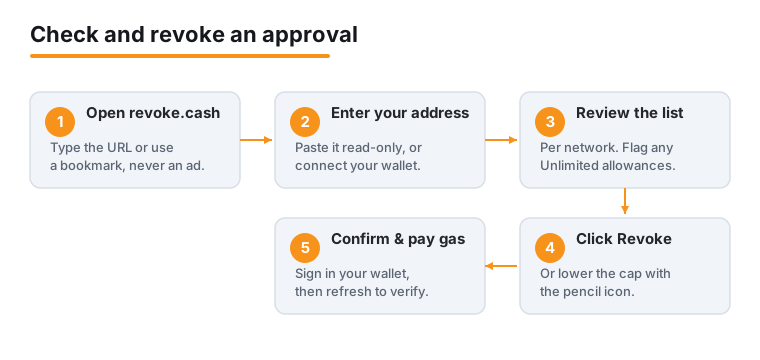
1. Open revoke.cash in your browser. Type the URL yourself or use a saved bookmark. Do not arrive through a search ad or a link someone sent you.
2. Connect your wallet, or simply paste your public address or ENS name into the search bar. Pasting your address is the safest first step because it is read-only and signs nothing.
3. Pick the network at the top, for example Ethereum, Polygon, Arbitrum, or BNB Chain. You must review each network separately, because approvals on Ethereum do not appear when you are looking at Polygon.
4. Wait for the list to load. You will see every active approval: the token, the spender contract, and the approved amount. An amount shown as Unlimited is the highest-risk kind.
5. Sort the list. revoke.cash recommends sorting Newest to Oldest if you suspect you just signed something bad, so the freshest approval sits at the top. You can also search by spender address.
If you prefer to stay inside your wallet, MetaMask offers a similar view. Per MetaMask's Help Center, you open MetaMask Portfolio (the web app at portfolio.metamask.io), connect your wallet, and use the Spending Caps tab. The Spending Caps view is part of MetaMask Portfolio on the web rather than the browser extension or the mobile app, and it covers Ethereum Mainnet, Polygon, BNB Chain, Optimism, and Base.
Revoking an approval step by step
Once you spot an approval you no longer need, removing it is straightforward.
1. Find the row for the approval and click the Revoke button next to it.
2. Your wallet will pop up asking you to confirm a transaction. Read it. A genuine revoke transaction sets the allowance to zero. Confirm it.
3. Pay the gas fee. This is the part people forget: revoking is an on-chain action, so it costs a small network fee. Both MetaMask and Ledger confirm there is no way around this for a standard approval. On a busy day Ethereum gas can be a few dollars per revoke; on cheaper networks like Polygon or Arbitrum it is often a fraction of a cent. Inspecting approvals and revoking them one at a time on revoke.cash is free, so you pay only the blockchain gas fee. Revoking several at once in a single batch costs 1.50 US dollars for free users, or nothing on one of the paid plans.
4. Wait for the transaction to confirm, then refresh. The approval should disappear or show zero.
A useful middle option: instead of fully revoking, click the pencil icon next to the amount to lower it. Say you actively trade on one exchange but hate that it has unlimited access. You can reduce the allowance to roughly what you actually trade, keeping the app usable while capping your exposure. A small worked example: if you only ever swap about 500 USDC at a time, setting the cap near 500 means a compromised contract can never take more than that, even though the convenience is mostly intact.
A simple security routine worth keeping
Approvals pile up quietly. A light, regular habit beats a panicked cleanup after something goes wrong. Several security guides, including practices echoed by MetaMask, suggest a monthly review.
1. Once a month, paste your address into revoke.cash and skim each network you use. Revoke anything you do not recognize or no longer use.
2. After every new dapp, especially a new or hyped one, check your approvals the same day. If the app turns out to be sketchy, you have a 24-hour head start.
3. Kill unlimited approvals on tokens you hold in size. There is rarely a good reason to leave an infinite allowance on a stablecoin balance worth thousands.
4. Use a separate wallet for risky activity. Keep long-term holdings in one address that never touches random websites, and do your minting and degen experiments from a small second wallet. If the throwaway wallet gets drained, your savings are untouched. For the safest storage of long-term funds, see our guide to cold storage and the broader walk-through of how crypto wallets work.
5. Disconnect is not the same as revoke. MetaMask is explicit about this. Disconnecting a site only stops it from seeing your balances. An approval you granted earlier still lets that contract move your tokens. You must revoke to actually cut off access.
Reading a signature request before you sign
The single most valuable skill is pausing at the wallet prompt and understanding what it asks. Most drains happen because people click Confirm on autopilot.
MetaMask's own anti-phishing guidance gives clear advice. First, always check the website URL in your browser bar against the address you expect. Drainer sites often use a near-identical name with a swapped letter or a different ending. Second, check that built-in security alerts are on. MetaMask enables them by default in the extension and mobile app, but you can confirm under Settings, then Transactions, where the security alerts toggle warns you about known malicious requests in real time. Third, be deeply suspicious of any request to sign a message whose purpose you cannot read in plain language.
Watch for these specific red flags in a signing prompt: the word Permit or Permit2 when you only meant to log in; a request that lists a spender address you do not recognize; a transaction described only as raw hexadecimal data; or any prompt that appeared right after you clicked an unexpected link. When in doubt, reject it. A rejected signature costs you nothing.
Why prompts are getting easier to read
For years a core problem was blind signing: wallets, especially hardware devices, often showed transactions as a wall of unreadable hex. You confirmed because you had no real choice. That is exactly how the roughly 1.5 billion US dollar Bybit hack in February 2025 worked, where attackers exploited blind signing to move 400,000 ETH.
In response, the Ethereum Foundation rolled out Clear Signing, which went live on May 12, 2026. It uses an open standard, ERC-7730, originally proposed by hardware wallet maker Ledger, to translate transaction data into structured, human-readable descriptions. The working group includes MetaMask, Ledger, Trezor, and others. In practice it means a signing prompt can now say, in words, that you are about to grant a spending permission on a specific token, instead of showing gibberish.
This is a real improvement, but it is not a force field. Clear Signing helps you understand what you are approving; it does not stop you from approving something harmful if you ignore the warning. The human pause still matters. If you want background on the decentralized apps where most approvals are created, our primer on decentralized finance explains the ecosystem.
What to do if you think you already signed something bad
Speed matters, because once an attacker holds an approval or signature, they can act at any moment. If you suspect a bad approval or a phishing signature, do this in order.
1. Move your liquid assets first. If you still control the wallet, transfer your most valuable, non-approved tokens to a fresh wallet you control. An approval only covers the specific token it names, so getting other assets out of reach is often faster than racing to revoke.
2. Revoke the suspicious approval on revoke.cash. For a Permit-style signature, both MetaMask and Scam Sniffer point to revoke tools that can cancel the underlying permission before it is used.
3. Assume the seed phrase is safe only if you never typed it. Approvals and signatures do not expose your secret recovery phrase. But if a fake support site asked you to enter your 12 or 24 words anywhere, treat the entire wallet as compromised and migrate everything to a brand-new seed immediately.
4. Be very wary of recovery offers. After a loss, scammers swarm victims with fake fund-recovery services that simply steal more. Genuine on-chain reversals are essentially impossible. Our guide to crypto recovery realities explains why most recovery promises are themselves scams.
Frequently asked questions
Does revoking a token approval cost money?
Yes, a small amount. Revoking is an on-chain transaction, so you pay the network's gas fee, confirmed by both MetaMask and Ledger documentation. On Ethereum that might be a few dollars when the network is busy; on networks like Polygon or Arbitrum it is usually a tiny fraction of a cent. Revoking approvals one at a time on revoke.cash is free, so you only pay the blockchain gas fee. Batch revoking several approvals in one transaction costs 1.50 US dollars unless you are on a paid plan.
Is revoke.cash safe to use?
The tool is widely used and only ever asks you to sign the specific revoke transactions you choose. The safest way to start is to paste your public address into the search bar, which is read-only and signs nothing. Always reach the site by typing the address yourself or using a bookmark, never through a search ad or a link sent in a message, since fake clones exist.
If I disconnect a website from my wallet, am I protected?
No. MetaMask states clearly that disconnecting and revoking are different. Disconnecting only stops a site from seeing your balances. Any token approval you granted earlier stays active and still lets that contract move your tokens. To actually cut off access you must revoke the approval on-chain.
Can I lose crypto just by signing a message, without sending a transaction?
Yes. This is signature phishing using Permit or Permit2. You sign an off-chain message that looks harmless, the attacker submits it to the blockchain, and then drains the named token. Security firm SlowMist has documented full wallet sweeps from a single signature. Treat any request to sign something you cannot read in plain language as dangerous.
Why do so many apps ask for unlimited approval?
Convenience. With an unlimited allowance you approve once and never have to re-approve for that token, which saves repeated gas fees and clicks. The downside is exposure: if the contract is hacked or malicious, your whole balance of that token can be taken. You can reduce the cap to roughly the amount you actually use by clicking the pencil icon on revoke.cash.
How often should I check my approvals?
A monthly review is a common recommendation, and it only takes a few minutes per network. Also check the same day after using any new or hyped app. If you keep long-term savings in a separate wallet that never connects to random sites, your routine cleanup work shrinks and your worst-case loss is far smaller.