Are Hardware Wallets Worth It?
A hardware wallet is a small physical device that holds the secret keys to your crypto and keeps them off any computer or phone. The idea is simple: the keys are generated inside a chip and never leave it, so even if your laptop is full of malware, a thief cannot sign a transaction without the device in hand. That sounds essential, and for some people it is. For others it is an extra gadget that solves a problem they do not have yet. This guide walks through who actually benefits, how the devices work in plain terms, an honest look at the two best-known brands, and the mistakes that empty wallets faster than any software bug. This is educational content, not financial advice.
What the device actually does
Your crypto does not live on a phone or in an app. It lives on a public network, and what you really own is a private key: a long secret number that proves you control a given balance. Whoever has that key can move the funds. So the whole game is keeping the key secret while still being able to use it.
A hardware wallet generates the private key inside itself and refuses to ever show it to the outside world. When you want to send crypto, your computer or phone builds the transaction and passes it to the device. The device shows you the amount and destination on its own screen, you confirm by pressing a physical button, and only the finished signature comes back out. The key stays inside the chip the whole time.
This matters because most theft does not happen by breaking math. It happens through fake apps, malicious browser pop-ups, and clipboard malware that swaps the address you paste. A hardware wallet defeats those because nothing on your infected machine can sign without you physically approving it on a separate screen. If you want the broader picture of keeping coins offline, see our overview of cold storage and the general guide to crypto wallets.
Who needs one and who does not
Be honest about your situation before spending money. A hardware wallet is genuinely worth it if you hold a meaningful amount you would hate to lose, you plan to keep crypto for years rather than trade weekly, or you interact with DeFi apps and sign contract approvals that could drain a hot wallet. If a single phishing click would ruin your month, a device pays for itself.
You probably do not need one yet if you hold a small amount you are still learning with, you keep your coins on a regulated exchange and treat that like a savings account, or the value on the line is less than the price of the device plus the hassle. There is no shame in starting small. Many people keep beginner amounts in a reputable mobile wallet and graduate to hardware once the balance grows.
A rough rule some long-term holders use: once the amount you would not want to lose to a hacked phone is several times the cost of a wallet, the device starts making sense. There is no magic number, and your own risk tolerance decides it.
The two names you will keep hearing
Two brands dominate the conversation: Ledger, based in France, and Trezor, based in the Czech Republic and one of the oldest names in the field. Both make solid devices used by millions of people. They take different philosophies, and that difference is the real story.
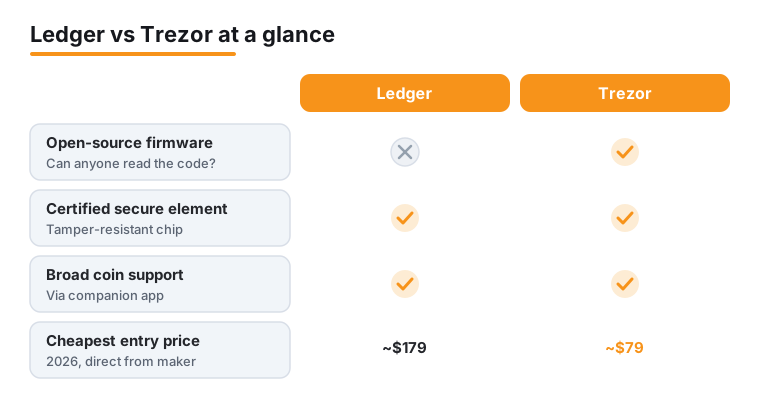
Trezor publishes its firmware as open source, meaning anyone can read the code that runs on the device and check what it does. Ledger keeps its firmware proprietary, arguing that closed code on a certified chip is harder for attackers to probe. Neither approach is automatically safer. Open source lets the community audit; closed source with a certified secure element resists physical attacks. Which you trust more is partly a values question, and it is fine to weigh that for yourself.
Ledger versus Trezor, the honest comparison
Secure element. Both brands now ship a secure element, the same tamper-resistant chip class used in passports and bank cards. Trezor's Safe 3 and Safe 5 use a chip certified to Common Criteria EAL6+, a high security rating. The newer Safe 7 pairs an EAL6+ element with TROPIC01, an open and auditable secure element, so you get the certified chip plus code people can inspect. That openness cut both ways in June 2026, when Trezor disclosed that Ledger's Donjon research team had used a laser fault injection attack in a lab to pull secrets out of the TROPIC01 chip. Trezor says funds are not at risk, because TROPIC01 is only one of three independent security layers and the attack needs physical possession of the device plus specialist equipment, but the flaw sits in hardware, so no firmware update can remove it. Ledger has shipped certified secure elements across its range for years. Older open-source-only Trezor models without a secure element are easier to attack if someone physically steals the device, which is one reason the Safe line exists.
Open source. Trezor wins here. Its firmware is fully public. Ledger's is not, though Ledger does open-source parts of its stack.
Supported coins. Both cover thousands of coins and tokens through their companion apps, Ledger Live and Trezor Suite. Counts shift constantly and marketing numbers vary, so the practical test is to check the live app for the specific coins you hold before buying. For most people holding Bitcoin, Ethereum, and major tokens, both are more than enough.
Price (2026, direct from each maker, before tax and shipping). Trezor Safe 3 around 59 dollars, Safe 5 around 129 dollars, Safe 7 around 249 dollars. On the Ledger side the Nano Gen5 sits around 179 dollars, the Flex around 249 dollars, and the premium Stax around 399 dollars. Ledger also still sells lower-cost older models. Prices change, so confirm on the official site.
One honest caveat about Ledger. In 2023 Ledger launched an optional, opt-in seed backup service called Ledger Recover and a clumsy explanation set off a lasting trust debate, because it confirmed that firmware could in principle move an encrypted copy of your seed off the device if you chose to enable it. No breach of the Recover service itself was ever shown, and the feature is opt-in, but the episode is why some people prefer Trezor's fully open code. You should know it exists so you can decide for yourself. See CoinDesk for the original reporting.
Setting one up, step by step
The process is similar for both brands. Set aside thirty quiet minutes and do not rush.
1. Buy only from the maker's own website (ledger.com or trezor.io) or a listed authorized reseller. More on why in the risks section below.
2. Inspect the package. A genuine device never arrives with a recovery phrase already written on a card and never with a PIN already set. If either is pre-filled, stop and do not use it.
3. Install the official companion app. For Ledger that is Ledger Live, downloaded only from ledger.com. For Trezor that is Trezor Suite from trezor.io. Do not click app links from inside the box or from search ads.
4. Run the genuine check. Ledger Live has a built-in Genuine Check that cryptographically confirms the secure element is authentic. Trezor Suite verifies the device when you connect it. Run this before doing anything else.
5. Install the latest firmware when the app prompts you. The device should show its own model and a firmware version that matches the maker's changelog.
6. Choose Create new wallet. The device generates a fresh recovery phrase, usually 12, 20, or 24 words depending on the model. Write the words on the paper card by hand, in order. Never photograph them, never type them into any app, never store them in cloud notes or a password manager.
7. Confirm the words back to the device when asked, set a PIN on the device itself, and you are done. Send a tiny test amount first, then send it back, before moving anything large.
The recovery phrase is the whole ballgame
People obsess over which chip is most secure and then lose everything because they mishandled twelve words. The recovery phrase (also called a seed phrase) is a human-readable backup of your private keys. Anyone who reads it can recreate your wallet on any device, anywhere, and take your funds. The hardware wallet only protects the key while it is inside the chip; the written words are the master copy.
So treat the phrase like the deed to a house. Write it on the supplied card or stamp it into metal if you want fire and water resistance. Store it somewhere private and offline. Never enter it into a website, a chat with support, or a pop-up, no matter how official it looks. Real support will never ask for it.
A worked example of how this goes wrong: someone gets a convincing email saying their wallet needs to be revalidated, clicks through to a fake Ledger Live page, and types in their 24 words to log in. Within minutes the wallet is emptied. The device was never touched. The phrase did all the damage. Our guides on crypto scams and fraud and general Bitcoin security go deeper on spotting these traps.
The real risks: fake devices and tampered supply
The math inside these devices is strong. The weak points are the box it came in and the human holding it. In 2026 the most documented threat is counterfeit hardware. Security researchers traced fake Ledger units sold through some online marketplaces, especially cheap listings on Chinese platforms, that looked identical to the real thing but contained extra chips and modified firmware designed to leak your recovery phrase. The same operation pushed counterfeit companion apps, and reported losses tied to the fake app side alone passed 9.5 million dollars across more than fifty victims. See the writeup at Cybersecurity News.
This is why buying from the official store matters so much. A counterfeit can be set up to either come with a known seed (so the attacker already has your keys) or to quietly send your generated seed back to them. Protect yourself with a short checklist:
1. Buy direct from ledger.com or trezor.io, or a reseller listed on their own site. Skip auction sites and unknown marketplace sellers, even if cheaper.
2. Refuse any device with a pre-filled recovery phrase or a PIN already set.
3. Run the maker's genuine check the moment you connect it.
4. Generate your own fresh phrase during setup. If the screen ever shows you a phrase you did not just create, the device is compromised.
Ledger's own guidance on this is worth reading: Ledger Academy.
Cheaper and free alternatives for small amounts
If you are holding a modest amount and not ready to spend on hardware, you still have safer options than leaving coins in a browser extension you barely understand.
A reputable mobile or desktop software wallet, set up carefully with its own offline-written recovery phrase, is a reasonable home for beginner amounts. It is a hot wallet, meaning it is connected to the internet and therefore more exposed than hardware, but it costs nothing and is far better than an unbacked exchange account if the exchange fails.
Leaving a small, actively traded balance on a well-regulated exchange is also a defensible choice for funds you are about to use, as long as you understand you are trusting that company to hold your keys. Read more in our note on the trade-offs at buying and selling crypto.
The cheapest genuine hardware option is the entry model from either brand, around 59 dollars for a Trezor Safe 3, which still has a secure element. For many people that is the sensible first device: real protection without paying for a touchscreen. You can always upgrade later, and the same recovery phrase logic applies across the range.
Common mistakes that cost people money
Patterns repeat. Avoiding these handful of errors matters more than picking the perfect brand.
Storing the recovery phrase as a photo or in cloud notes. If your phone backup syncs those words anywhere online, the offline protection is gone.
Buying second-hand or from a marketplace bargain. A used device may already be controlled by someone else.
Approving transactions without reading the device screen. The screen is there so you can catch a swapped address. Read every line before you press confirm.
Signing blind token approvals in DeFi. A malicious contract can ask for permission to move all of a token; the device shows what you are approving, so check it.
Keeping only one copy of the phrase in one place. A house fire or flood can wipe it out. Consider a metal backup or a second copy in a separate secure location, while remembering every copy is a target.
Telling people how much you hold. Quiet wallets get robbed less. There is no need to advertise.
Frequently asked questions
Can a hardware wallet be hacked remotely?
Not in the way most people fear. Because the private key never leaves the chip and every transaction needs a physical button press, a remote attacker cannot sign for you even if your computer is fully infected. The realistic dangers are tricking you into revealing your recovery phrase, or selling you a tampered device. Both involve the human or the supply chain, not breaking the device over the internet.
What happens if I lose or break the device?
Your funds are safe as long as you have the recovery phrase. Buy a new device of the same standard, choose the restore option, and enter your written words to rebuild the exact same wallet. The device is just a tool to access the keys; the phrase is the real backup. This is also why the phrase must be stored as carefully as the coins themselves.
Is Ledger or Trezor better in 2026?
Both are reputable and both now ship a certified secure element. Trezor appeals to people who want fully open-source firmware they can inspect. Ledger appeals to people who want a wide app ecosystem and a polished mobile experience. If open code is a priority for you, lean Trezor. If you want the cheapest genuine device with a secure element, the Trezor Safe 3 around 59 dollars is the value pick. There is no single winner for everyone.
Why does everyone say buy direct from the maker?
Because counterfeit and tampered devices are the most documented theft method, and they spread through marketplace and auction listings. A fake unit can be built to leak your recovery phrase. Buying from ledger.com or trezor.io, or a reseller listed on their own site, and then running the built-in genuine check, removes almost all of that risk for a few dollars of caution.
Should I write my recovery phrase on metal instead of paper?
For larger holdings it is a reasonable upgrade. The supplied paper card is fine for the words, but paper burns and gets wet. A stamped metal backup survives fire and flooding, which protects against losing access to your own funds in a disaster. It does nothing extra against theft, so storage location and secrecy still matter most.
Do I need a separate wallet for each coin?
No. A single device manages many different coins and tokens through its companion app, each with its own address derived from the same recovery phrase. Before buying, open Ledger Live or Trezor Suite and confirm the specific assets you hold are supported, since coverage differs slightly and changes over time.